
KMS ver. 1.2.399 – MapleStory NEXT: Union Champion!
The second patch of the MapleStory NEXT update has been released, featuring the new Union Champion and Champion Raid systems! Compared to KMST, they increased the difficulties of the Champion Evaluation missions.
The next official server patch will be on February 20, with the new boss Baldrix, so we can expect a test server update a week before that.
MapleStory NEXT Roadmaps
Content Roadmap:
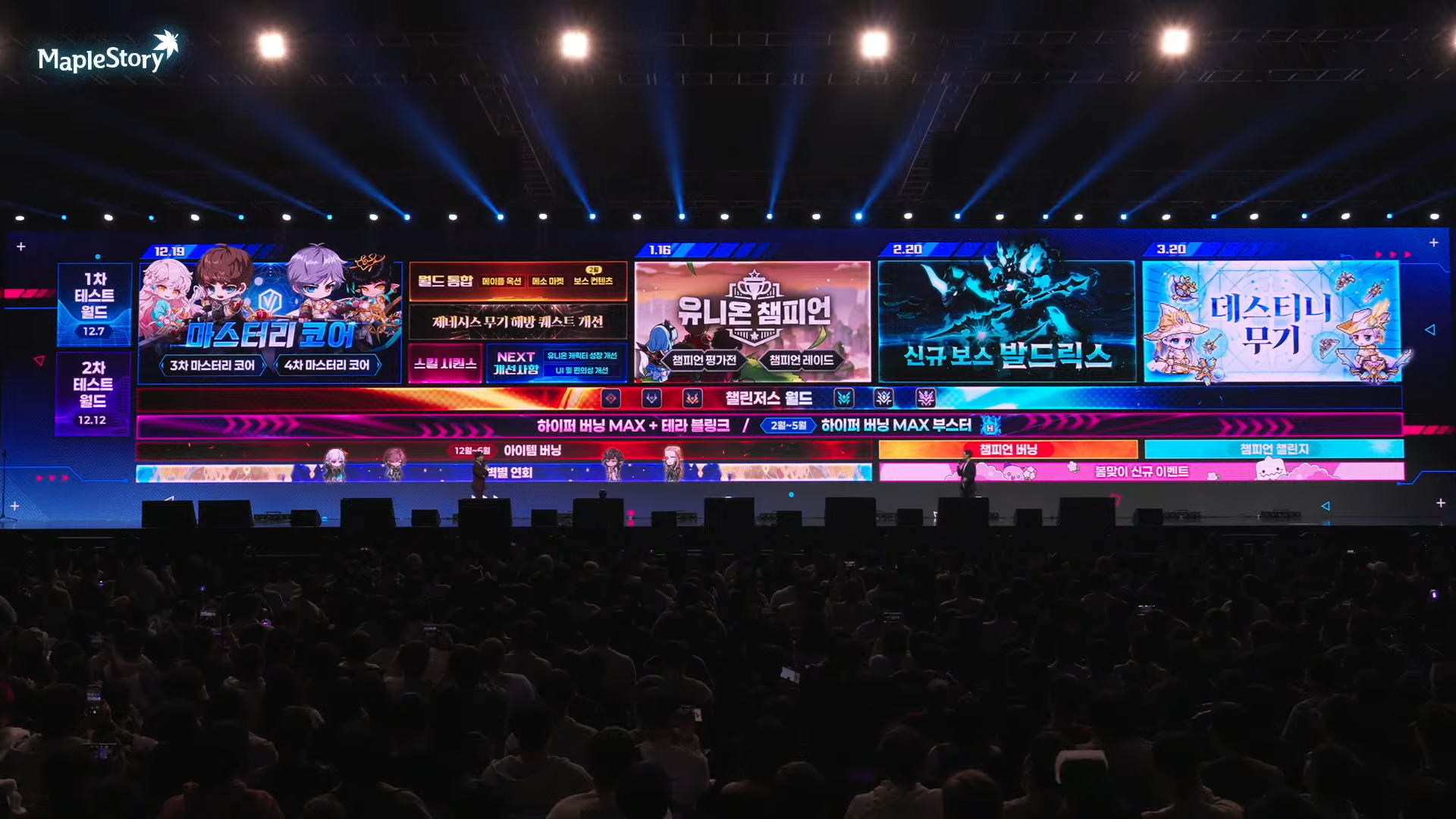
- December 19:
- Mastery Cores
- Cross World Maple Auction and Meso Market
- Genesis Weapon Liberation quest improvements
- Skill Sequence
- NEXT Improvements (Union character growth improvements, UI and convenience improvements)
- January 16:
- Union Champion (Champion Missions and Champion Raid)
- February 20:
- New Boss Baldrix
- March 20:
- Destiny Weapon
Event Roadmap:
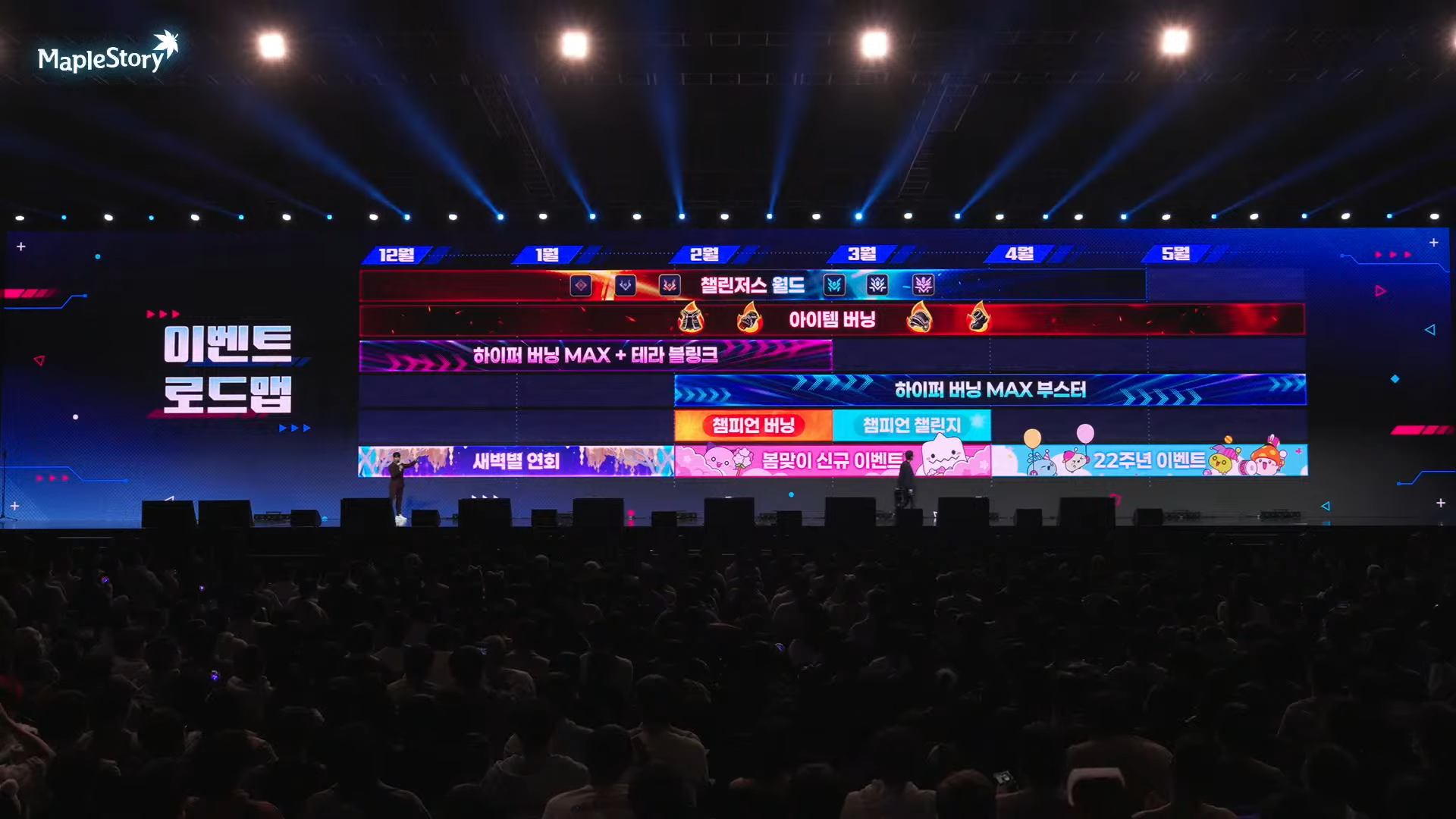
- December: Challengers World, Item Burning, Hyper Burning MAX + Tera Blink, Dawn Star Banquet
- February: Hyper Burning MAX Booster, Champion Burning/Champion Challenge, New Spring Event
- April: 22nd Anniversary Event
Overview

- Union Champion
- Champion Raid: Dragon Island
- Cash
- DirectX 11
- Smart AI Correction
- Intense Power Crystal Reorganization
- Improvements
- Error Fixes
- Events
Union Champion
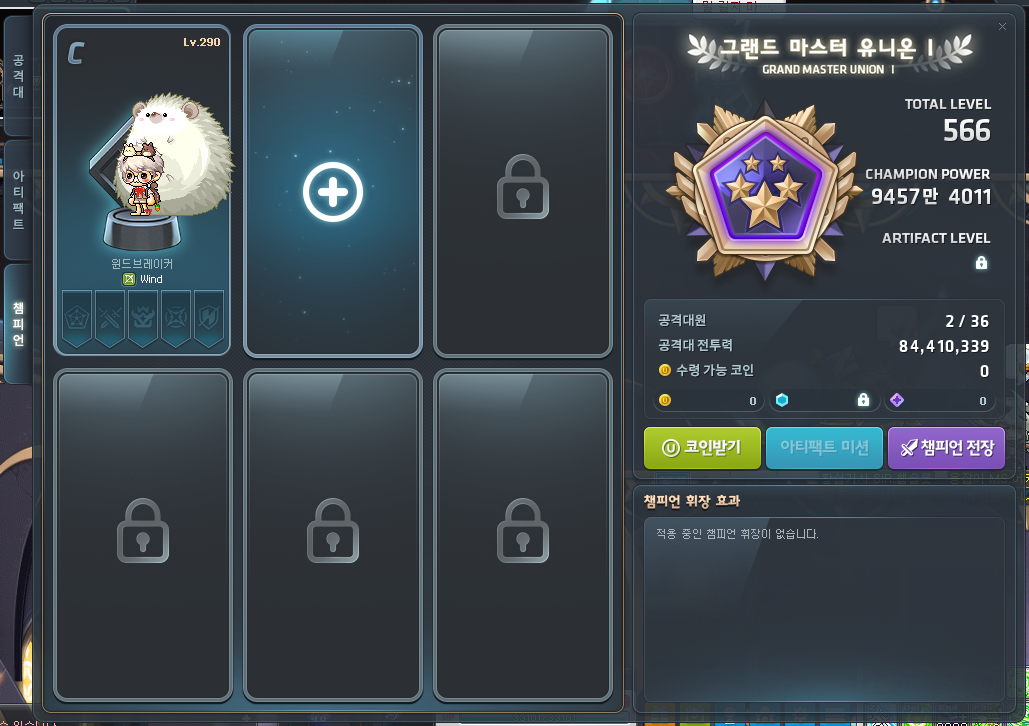
<Union Champion> has been added.
- Union Champion is a system where you can designate some of your characters within the world as Champions. Based on the growth level of each Champion character, all of your Champion characters’ stats will be increased.
- If your Union rank has reached Grand Master Union I or higher (8000 Union), and you have a level 260 or higher character within the world, you can talk to Dragon Hunter Ms. Account to accept the ‘[Union Champion] Champions’ Path’ quest and start the Union Champion system.
※ You cannot use Union Champion in Challengers World.
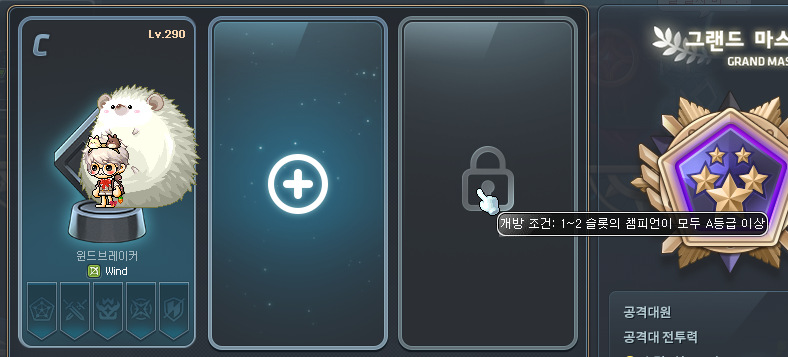
You can register characters in <Champion Slots>. Additional slots will be unlocked based on your registered characters’ <Champion Ranks>.
- You will be initially given 2 Champion Slots.
- 1 additional slot will be unlocked every time all registered Champions reach ‘A Rank’ or higher.
- Up to 3 Champion Slots can be unlocked at this time.
- If you want to remove a Champion, you must pay a 1b mesos fee. All Champion Evaluations related information including that character’s Champion Rank will be reset.
※ Once a slot is unlocked, it will stay unlocked, even if other conditions change such as removing a Champion.
※ You cannot register multiple characters with the same job as Champions.
※ A character registered as a Champion cannot be deleted.
※ A character registered as a Champion cannot Open Job Advance to a different job.
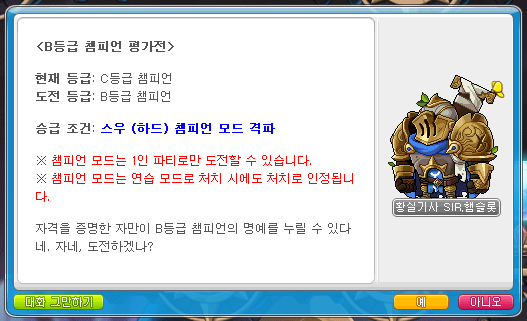
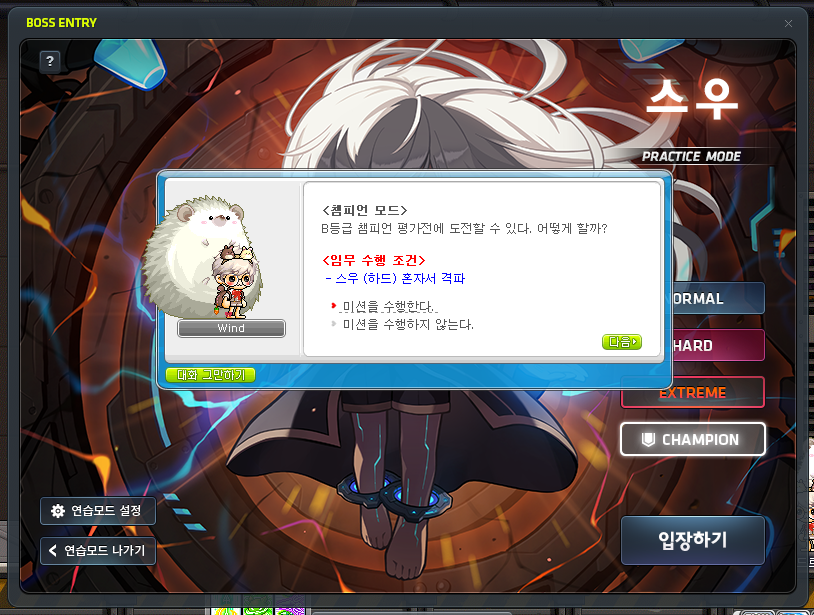
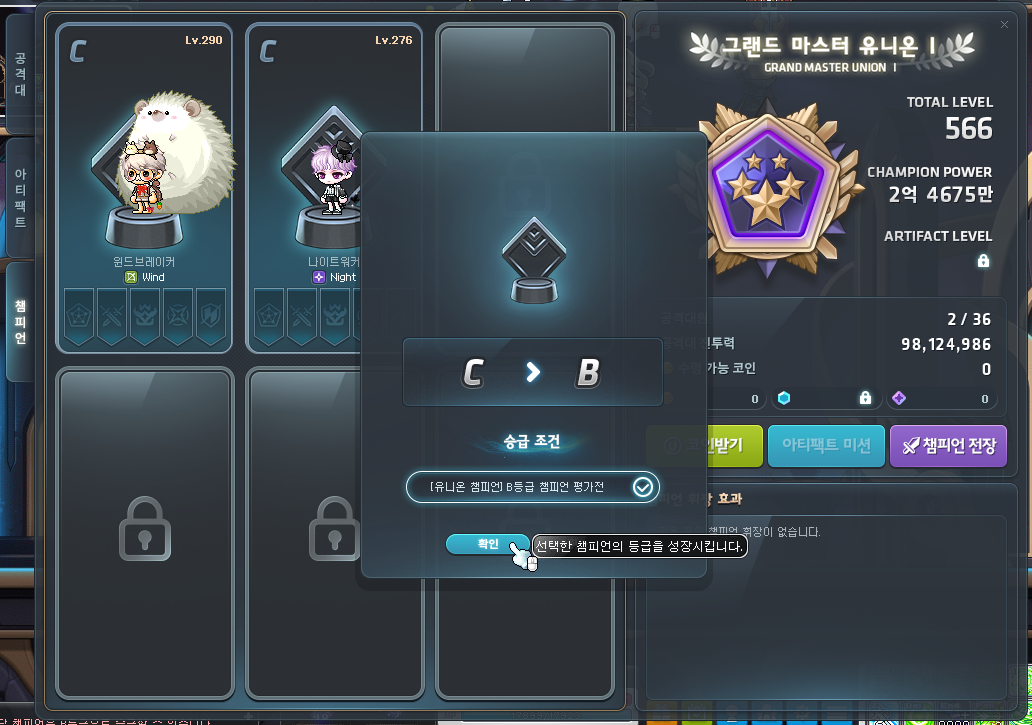
You can increase your Champion Ranks by completing <Champion Evaluations>.
- When a Champion is registered, they will be assigned ‘C Rank’.
- You can accept Champion Evaluations through the Royal Knight Sir Hamcelot.
- You can increase your Rank by completing Champion Evaluations. The details are as follows.
| Champion Evaluation | Evaluation Details |
|---|---|
| B Rank Champion Evaluation | Solo Suu (Hard) in Champion Mode within 20 minutes. |
| A Rank Champion Evaluation | Solo Jin Hilla (Hard) in Champion Mode within 20 minutes. |
| S Rank Champion Evaluation | Solo Black Mage (Hard) in Champion Mode within 45 minutes. |
| SS Rank Champion Evaluation | Solo Chosen Seren (Hard) in Champion Mode within 20 minutes. |
| SSS Rank Champion Evaluation | Solo Watcher Kalos (Normal) in Champion Mode within 20 minutes. |
※ When a Champion Evaluation is in-progress, you can choose ‘Champion Mode’ in the Boss UI.
※ You can enter ‘Champion Mode’ in Practice Mode and a success in Practice Mode will also be recognized.
※ If you enter ‘Champion Mode’ in Practice Mode, you will receive the ‘Hamcelot’s Protection’ buff that reduces damage taken (including % HP attacks) by 25%.
※ You cannot use ‘Champion Mode’ (including Practice Mode) if you are on a Red PC.
※ ‘Champion Mode’ cannot be played at the same time as ‘Genesis Mode’.
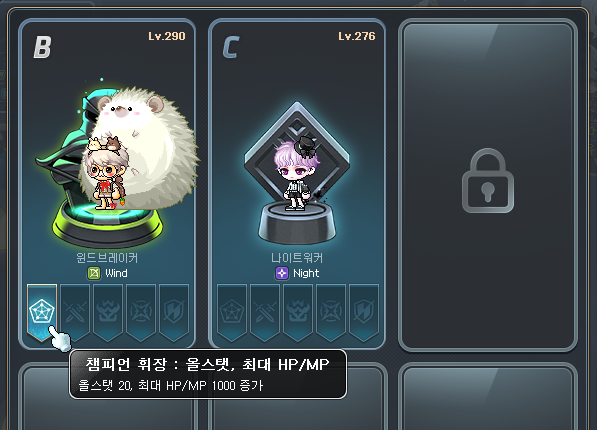
You can acquire various stats through <Champion Insignias>.
- Champion Insignias are a system that provides powerful stats to the characters designated as Champions within the world.
- Each Champion can acquire Insignias based on their Rank. The acquired Champion Insignias stack as their Ranks increase.
| Champion Rank | Insignia Stats |
|---|---|
| B Rank | All Stats +20, Max HP/MP +1,000 |
| A Rank | Attack/Magic Attack +10 |
| S Rank | Boss Damage +5% |
| SS Rank | Critical Damage +3.00% |
| SSS Rank | Defense Ignore +5% |
- The stats of the acquired Champion Insignias from each Champion are added together and applied to all Champion characters.
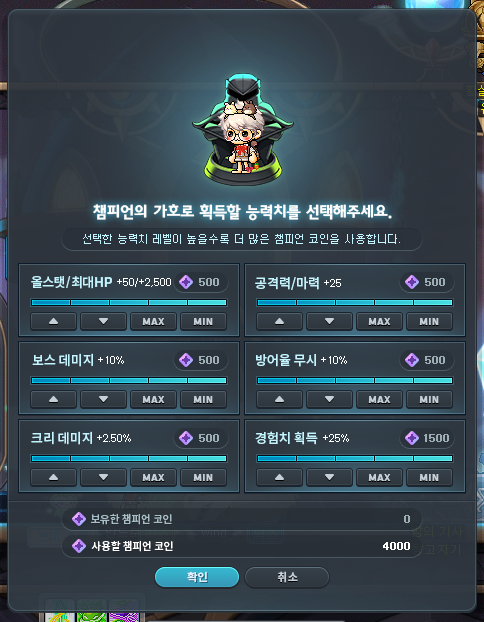
Characters registered as Champions can use <Champion’s Blessing> buffs which provide powerful stats for a certain period of time.
- Champion’s Blessing is a skill that lets you acquire a stat buff that lasts for 30 minutes by using Champion Coins.
※ Champion’s Blessing can be used in the Skill UI’s Beginner skill tab.
※ Champion Coins can be acquired by exploring the Champion Raid: Dragon Island.
※ Champion’s Blessing cannot be used in boss maps and Champion Raid: Dragon Island.
- Champion’s Blessing lets you customize the values of the six types of stats that are acquired. The stats and values by level are as follows.
| Stat | Level 1 | Level 2 | Level 3 | Level 4 | Level 5 |
|---|---|---|---|---|---|
| All Stats/Max HP | +10/+500 | +20/+1,000 | +30/+1,500 | +40/+2,000 | +50/+2,500 |
| Attack/Magic Attack | +5 | +10 | +15 | +20 | +25 |
| Boss Damage | +2% | +4% | +6% | +8% | +10% |
| Defense Ignore | +2% | +4% | +6% | +8% | +10% |
| Critical Damage | +0.50% | +1.00% | +1.50% | +2.00% | +2.50% |
| Additional Experience Acquisition | +5% | +10% | +15% | +20% | +25% |
- The number of Champion Coins consumed is based on each stat’s level. The total Champion Coin cost of each stat’s selected level is added up and consumed.
- However, the ‘Additional Experience Acquisition’ stat consumes more Champion Coins.
- The Champion Coins you hold will be reset every 1st day of the month at 12:00 AM.
| Stat Level | Champion Coins Consumed | Champion Coins Consumed (Additional Experience Acquisition) |
|---|---|---|
| Level 1 | 50 | 150 |
| Level 2 | 125 | 375 |
| Level 3 | 200 | 600 |
| Level 4 | 300 | 900 |
| Level 5 | 500 | 1,500 |
Champion Raid: Dragon Island
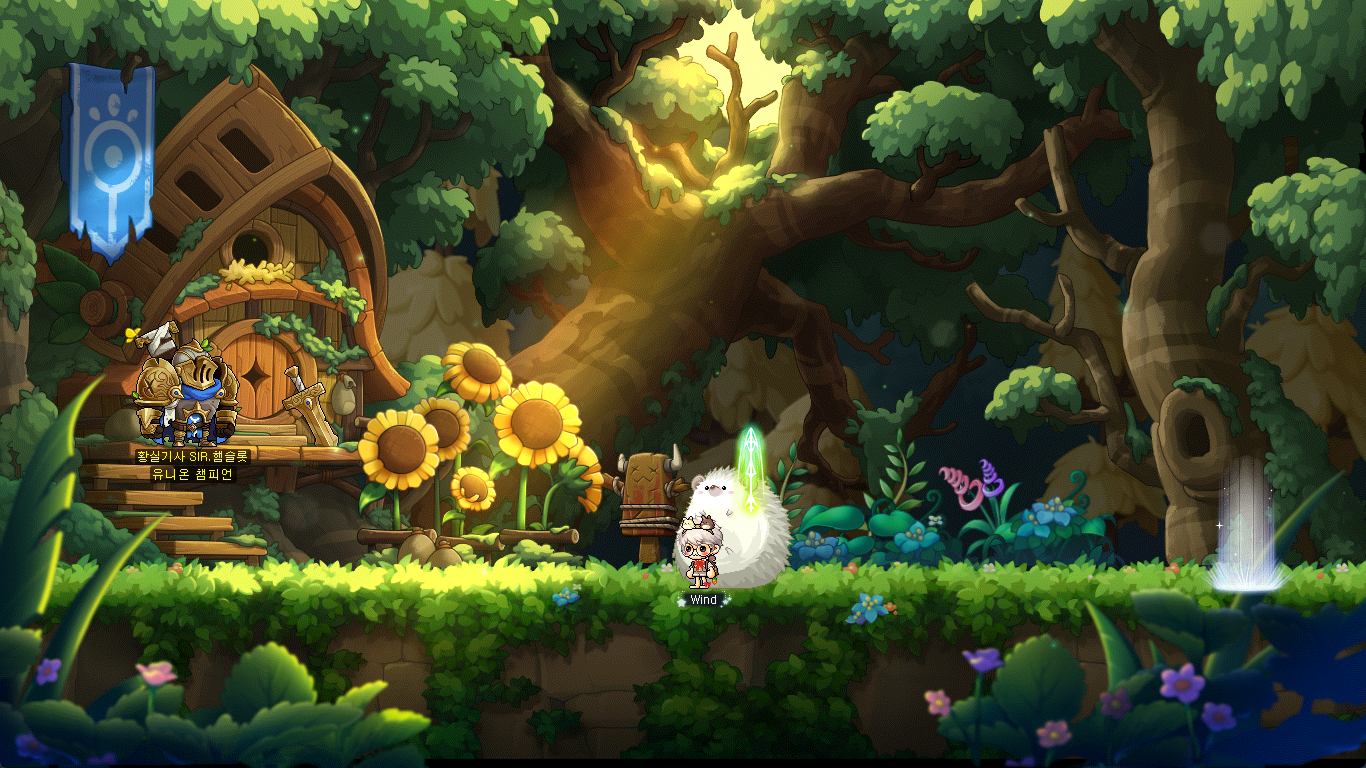
Dragon Island, the island ruled by wild dragons. Use your Union Champions to help Royal Knight Sir Hamcelot to defeat the dragons and acquire Champion Coins.
Participation Requirements:
- A level 260 or higher character registered as a Champion after completing the ‘[Union Champion] Champion’s Path’ quest.
- You can only participate if you have 2 or more characters registered as Champions.
Participation Method:
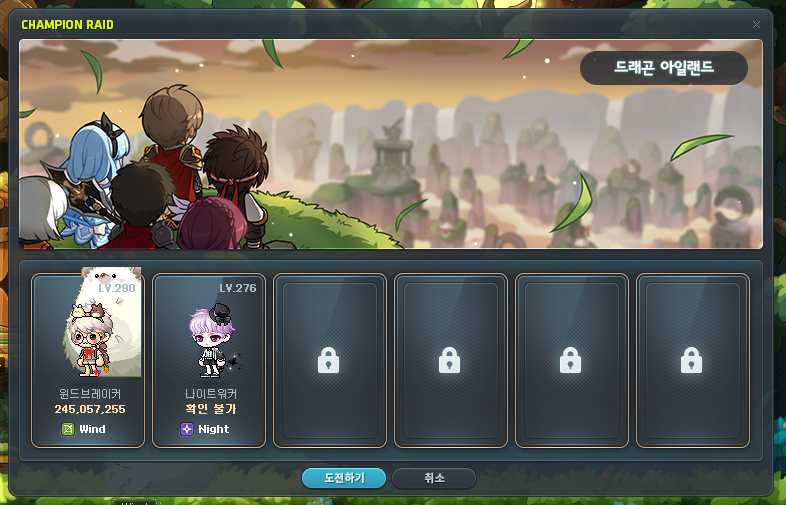
- After completing the ‘[Union Champion] Champion’s Path’ quest from Dragon Hunter Ms. Account, you can register your characters as Champions through the Union UI’s Champion tab.
- After registering 2 or more Champions, you can participate in the Champion Raid through the Union UI’s ‘Champion Battlefield’ button.
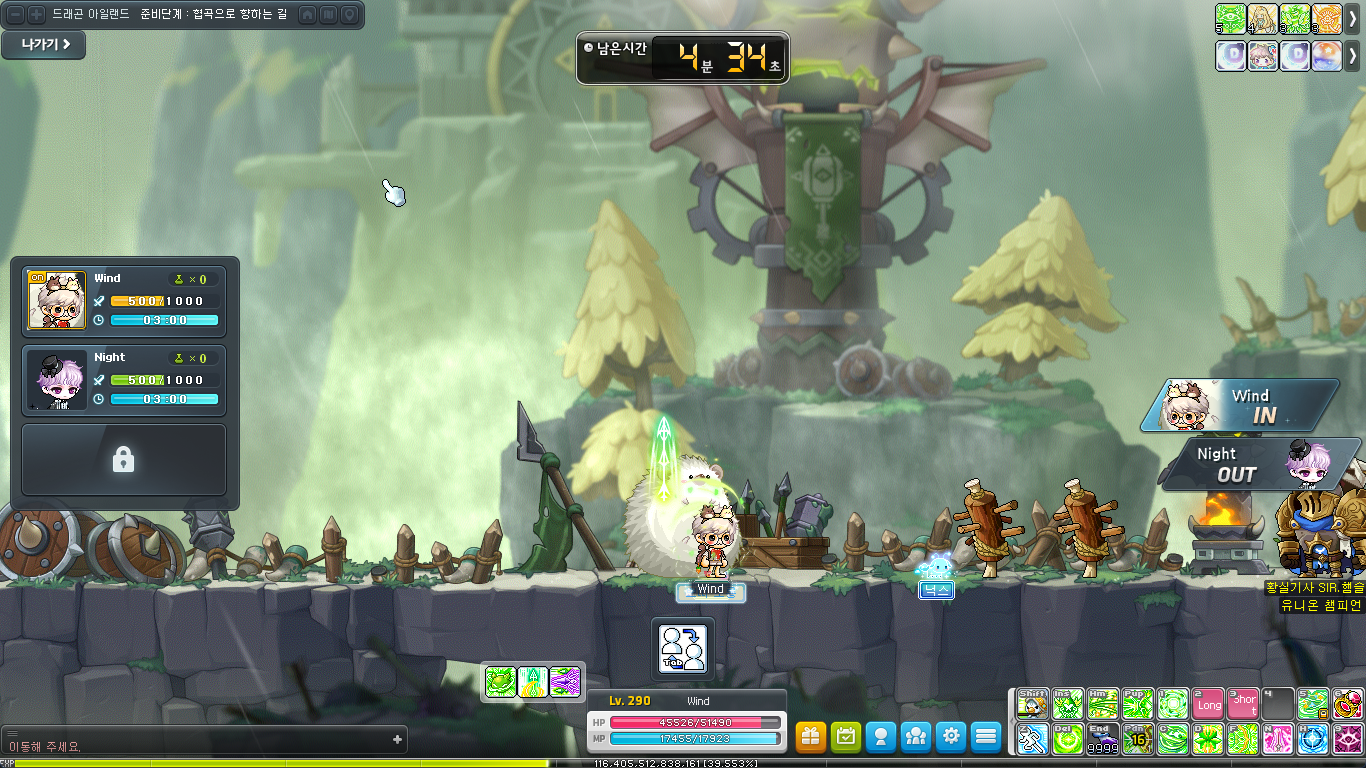
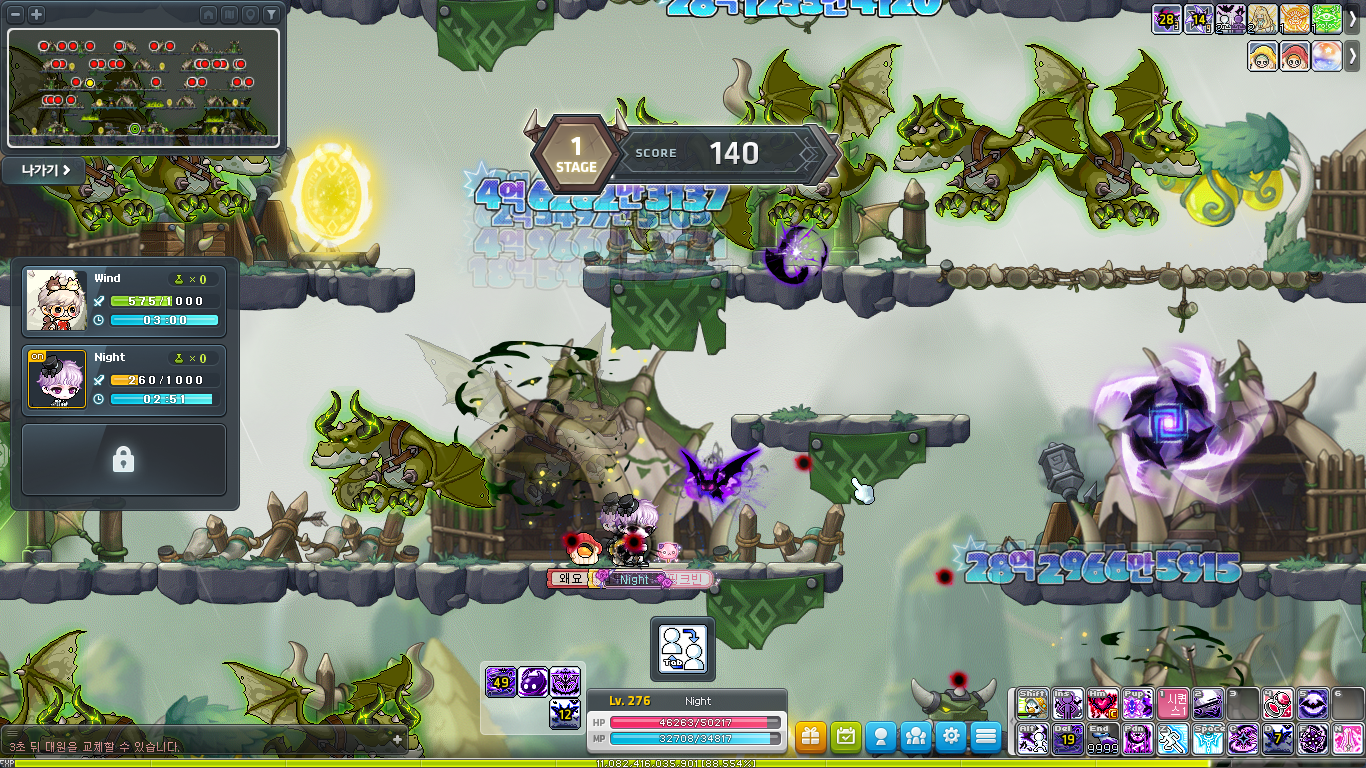
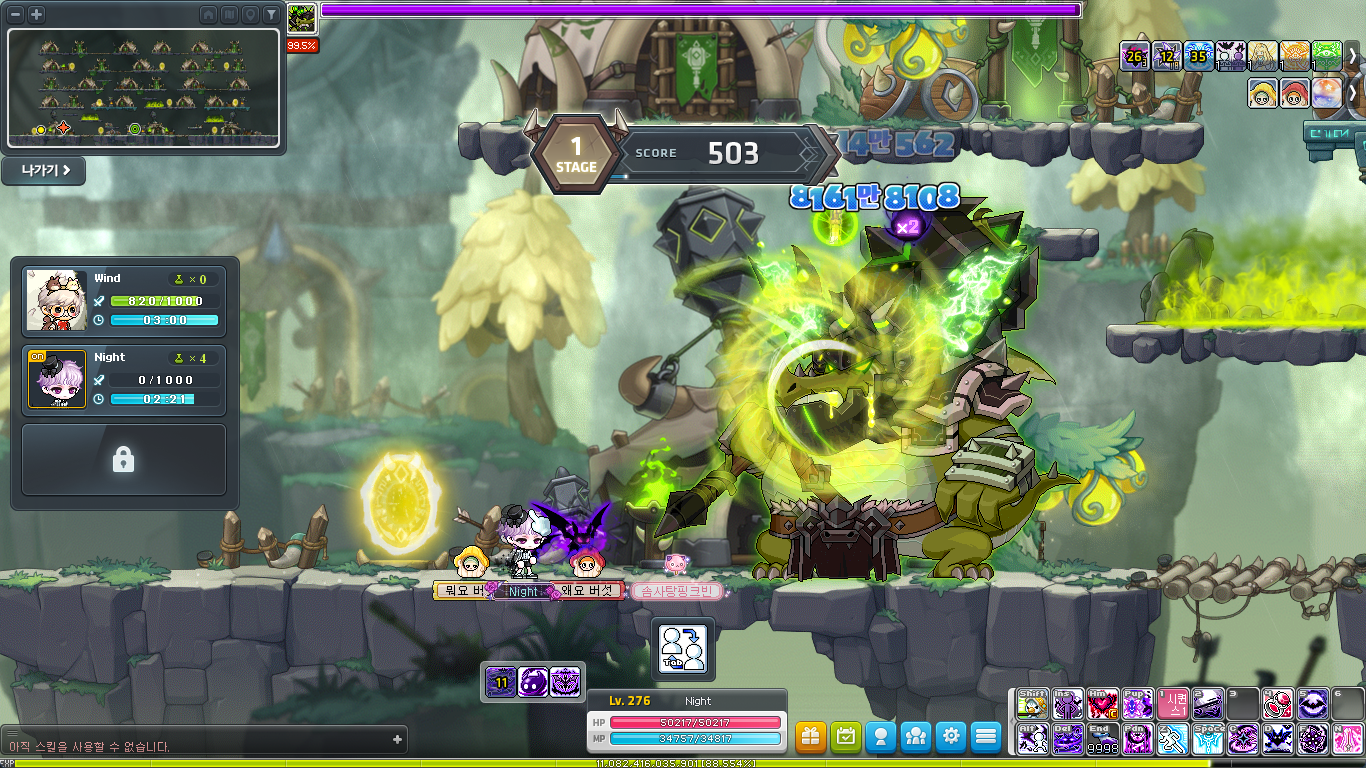
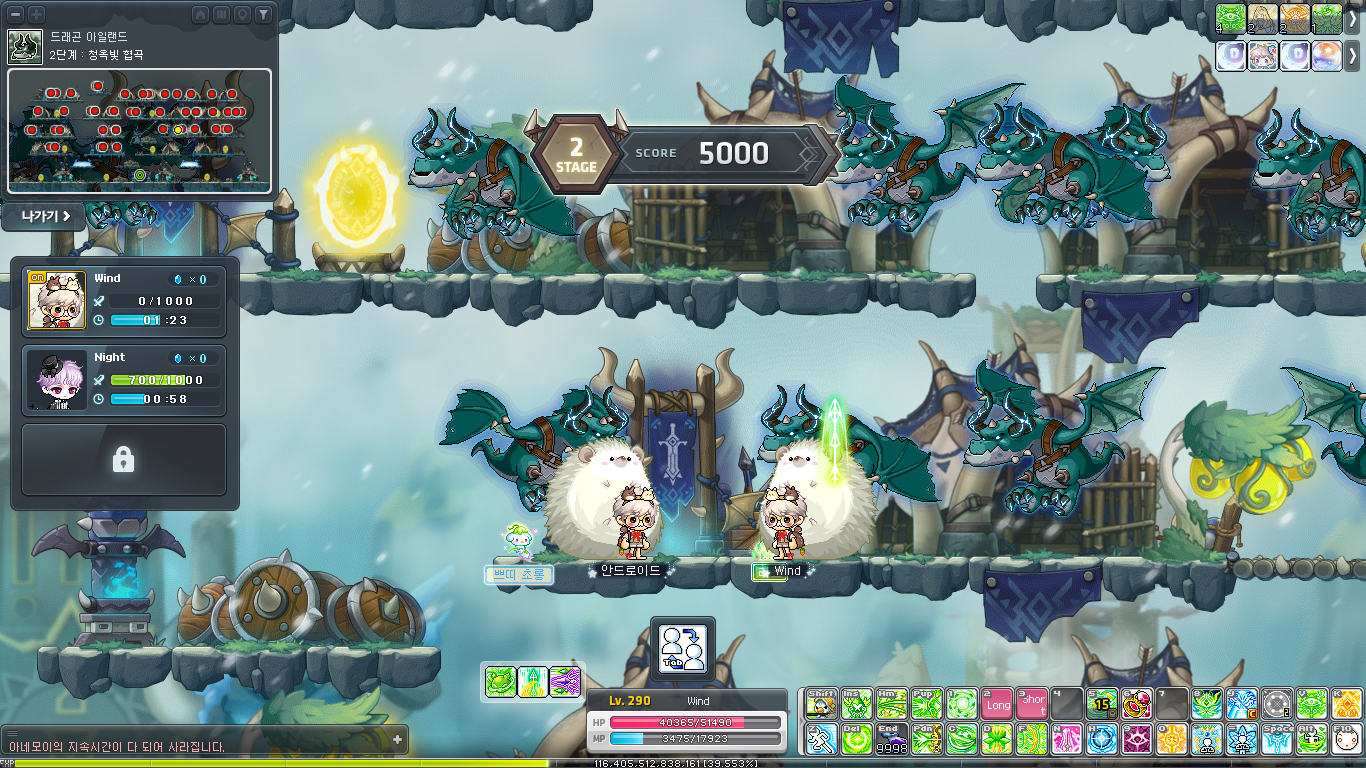
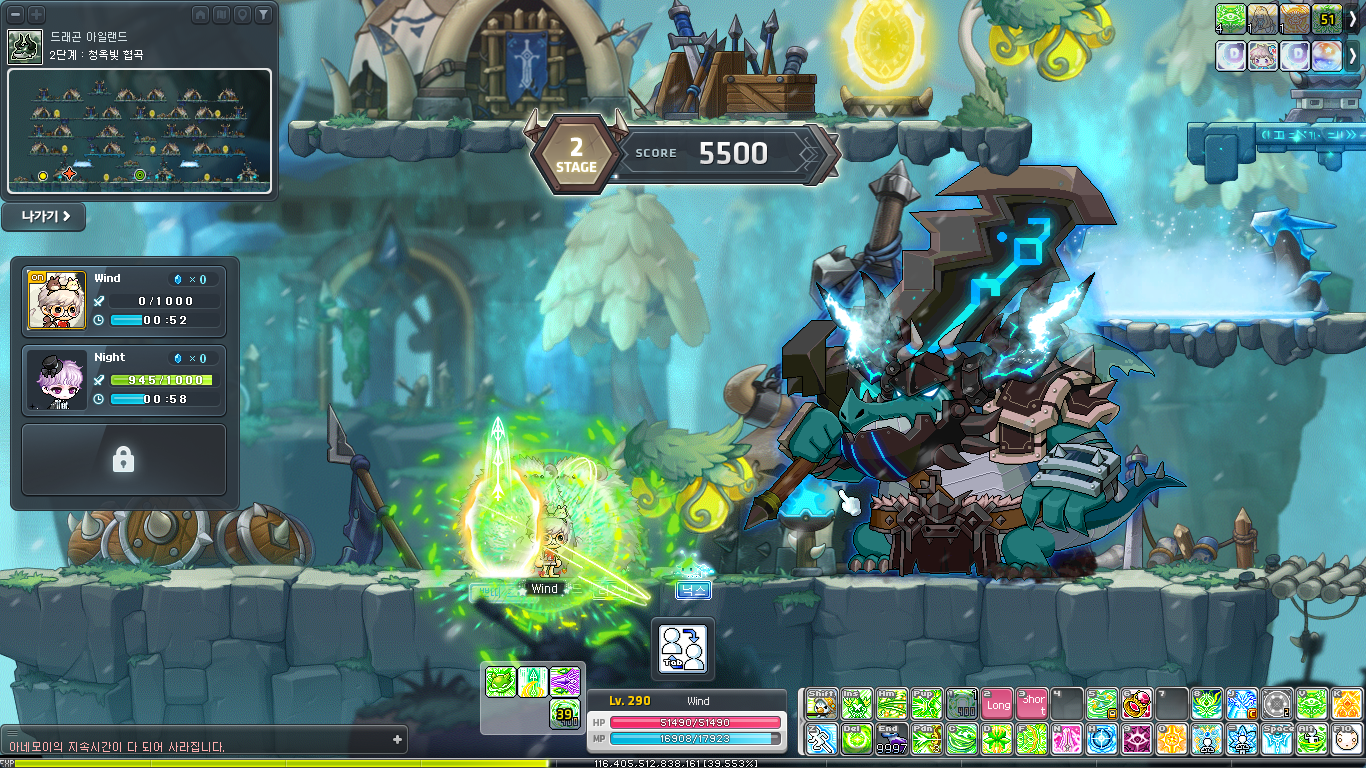
- When you enter the Champion Raid, you can play by switching between your registered Champions in real time using the Tab key. You can control each Champion for up to 3 minutes. (This is shown as the blue bar beside each character)
- The Champion Raid will end after you have used up all of your Champions’ play times.
- Champions on standby will charge their Bond Gauge. When you switch to a character that has a charged Bond Gauge, you will acquire a final damage boost effect. (This is shown as the bar above the play time beside each character)
- The Champion Raid consists of a total of 6 stages. You can acquire Champion Coins based on your total score.
※ The score acquired in Champion Raid is shared between all characters within the world.
※ You can re-enter and re-challenge the Champion Raid after completing it. If you get a higher score, you can acquire the additional Champion Coins.
※ If you leave while inside, you can acquire points but the stage progress record will be reset.
※ The Champion Raid progress record will be reset every 1st of the month at 12:00 AM.
※ Certain UI features may be restricted while inside the Champion Raid.
※ Shortcut keys changed while inside the Champion Raid will not be saved when you leave.
Clear Rewards:


- Champion Coins
※ The number of Champion Coins given as a reward is based on your acquired score.
※ The Champion Coins you have will be reset every 1st of the month at 12:00 AM.
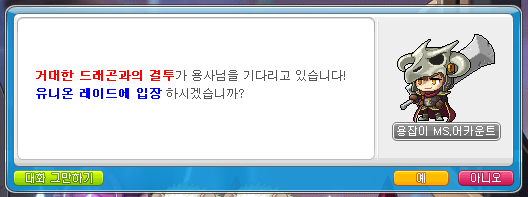
You can participate in the existing Union Raid through Dragon Hunter Ms. Account in towns.
Union Champion & Champion Raid Summary
I’m gonna try to summarize this new system (along with some information that may have been unclear or not included in the patch notes). First off, the Union Champion system itself.
- You can register characters as Champions. You get 2 slots by default and can unlock up to 1 more. The last 3 slots will become available at a later time.
- Your Champions cannot have multiple characters of the same job. This is one of the most common questions/concerns that I have seen. It means you cannot have something like 2 Dark Knights for example. However, you could have 1 Hero, 1 Dark Knight, and 1 Paladin (i.e. class branches can be repeated like 3x warriors).
- Each Champion starts at C Rank. You can increase each Champion’s Rank by completing the Champion Evaluations. You must do this in order, one by one.
- The Champion Evaluation requires you to solo certain bosses in ‘Champion Mode’. This is basically the ‘real mode’ of the boss but it forces you to enter in a party of 1 with the lowered time limit condition. You cannot complete Champion Evaluations through Genesis Liberation missions. You can also do them in Practice Mode and clears in Practice Mode will also count.
- After a Champion completes an Evaluation, its Rank can be increased and it will acquire an additional Champion Insignia based on the Rank. This Champion Insignia gives stats permanently to all Champion characters, and they all stack together.
- If all currently unlocked Champion Slots have Champions that are A Rank or higher, you can then unlock the next Champion Slot.
- I think there was some confusion from initial translations where people thought that unlocking a new Champion Slot would reset the progress of all Champion Ranks and you would have to redo all of the Champion Evaluation missions, but this is incorrect. The only time any progress is reset is if you decide to remove one of your Champions (e.g. if you wanted to replace one of your existing Champions with a different character), in which case you must pay 1b mesos. When that Champion is removed, only that Champion Slot will be completely reset, and the new character you designate in that slot will have to start from C Rank.
- I’ll give some examples of stats that you can gain from this system.
- Champion 1 completes the Champion Evaluations up to SSS Rank (clearing Normal Kalos within 20 minutes). It will acquire all 5 Insignias and give All Stats +20, Max HP/MP +1,000, Attack/Magic Attack +10, Boss Damage +5%, Critical Damage +3.00%, and Defense Ignore +5% to all Champions.
- Afterwards, Champion 2 completes the Champion Evaluations up to S Rank (clearing Hard Black Mage within 45 minutes). It will acquire the first 3 Insignias. This will stack with Champion 1’s Insignias, for a total of All Stats +40, Max HP/MP +2,000, Attack/Magic Attack +20, Boss Damage +10%, Critical Damage +3.00%, and Defense Ignore +5% to all Champions.
- Since Champion 1 and 2 are both A Rank or higher, you can unlock the third Champion Slot.
- Champion 3 completes the Champion Evaluations up to B Rank (clearing Hard Suu within 20 minutes). It will acquire the first Insignia. This will stack with Champion 1 and 2’s Insignias.
- If you had three characters that all completed the SSS Rank Champion Evaluations, your Champions would gain a total of All Stats +60, Max HP/MP +3,000, Attack/Magic Attack +30, Boss Damage +15%, Critical Damage +9.00%, and Defense Ignore +15%.
- Later on, when they unlock all 6 Champion Slots, if you had fully maxed out 6x SSS Rank Champions, the total stats would be doubled.
Then comes the Champion Raid: Dragon Island system.
- You need at least 2 Champions to enter the Champion Raid.
- When you enter, you have 5 minutes to do basic set up for your characters. All buffs will be removed upon entry. You cannot use any consumables, buffs, or things like Link Skills or Noblesse Guild Skills. You will be given Power Elixirs to use.
- Inside the Champion Raid, you can press the Tab key then 1/2/3 to switch between your Champions in real time.
- Each Champion can only be played for a total of 3 minutes. This time will not be deducted when there are no monsters on the map. While a character is on standby (not actively being played), their cooldowns will continue to tick down.
- Each Champion has a Bond Gauge. When they are on standby, it will slowly charge up. When you are playing a Champion that has the Bond Gauge filled, it will gain a temporary 25% final damage boost. I think he said on stream that this would be an important mechanic to get more points.
- The Champion Raid has 6 stages. In each Stage, you alternate between fighting normal monsters then fighting a boss. This happens 5 times each (for a total of 10 missions per Stage) before you complete the Stage and can enter the portal to go to the next Stage.
- When you are hit by certain attacks and environmental hazards, you will gain a stack of a Dangerous Status Effect. If it reaches 5 stacks, you will be inflicted with a powerful status effect. You can eat the fruit scattered around the map to heal yourself and cleanse the stacks.
- The Champion Raid is monthly content. It resets on the first day of every month.
- In my run on the test server, I reached Stage 2 and played it a bit, and when both of my Champions’ play times ran out, it automatically brought me to the exit map. I got a score of 9460 which rewarded me 9460 Champion Coins. You can always re-enter and try to get a higher score, which will give you additional Champion Coins.
- These Champion Coins will also be reset on the first day of every month, so you cannot save them up like other currency.
- You can use your Champion Coins to get a 30 minute buff by using the new beginner skill Champion’s Blessing, available on your Champion characters.
- The Champion’s Blessing skill lets you choose which stats and what level of each stat that you want. The cost of using the skill is Champion Coins, based on the levels that you selected.
- You can choose any combination of stats and levels, as long as you have enough Champion Coins.
- For example, a fully maxed out Champion’s Blessing (Level 5 of all 6 stats) would cost 4000 Champion Coins.
- Realistically, you wouldn’t choose the ‘Additional Experience Acquired’ stat (which actually has higher costs than the other stats) when bossing so level 5 of the remaining 5 stats would cost 2500 Champion Coins.
- You need to be careful with this as the Champion Coins can only be acquired from the Champion Raid, which is monthly. So you will need to carefully plan when you use them so you don’t run out of Champion Coins early on and then you’re left without it for the rest of the month.
Basically, the Union Champion system which gives permanent stats to all of your Champions requires no upkeep. Once you have completed a Champion Evaluation on a character, it will gain the corresponding Insignia and will never lose it (unless you remove that character as a Champion). You can gradually strengthen your characters, complete more Evaluations, and get more stats until they are all SSS Rank.
The Champion Raid system which gives stats in the form of 30 minute duration buffs is monthly content. You go in, play as your Champions for [3 x number of Champions] minutes, and try to get the highest score possible to acquire Champion Coins. You can then use these Champion Coins to get 30 minute buffs through the Champion’s Blessing skill, which lets you specifically choose which stats and how much of each stat you want.
Cash

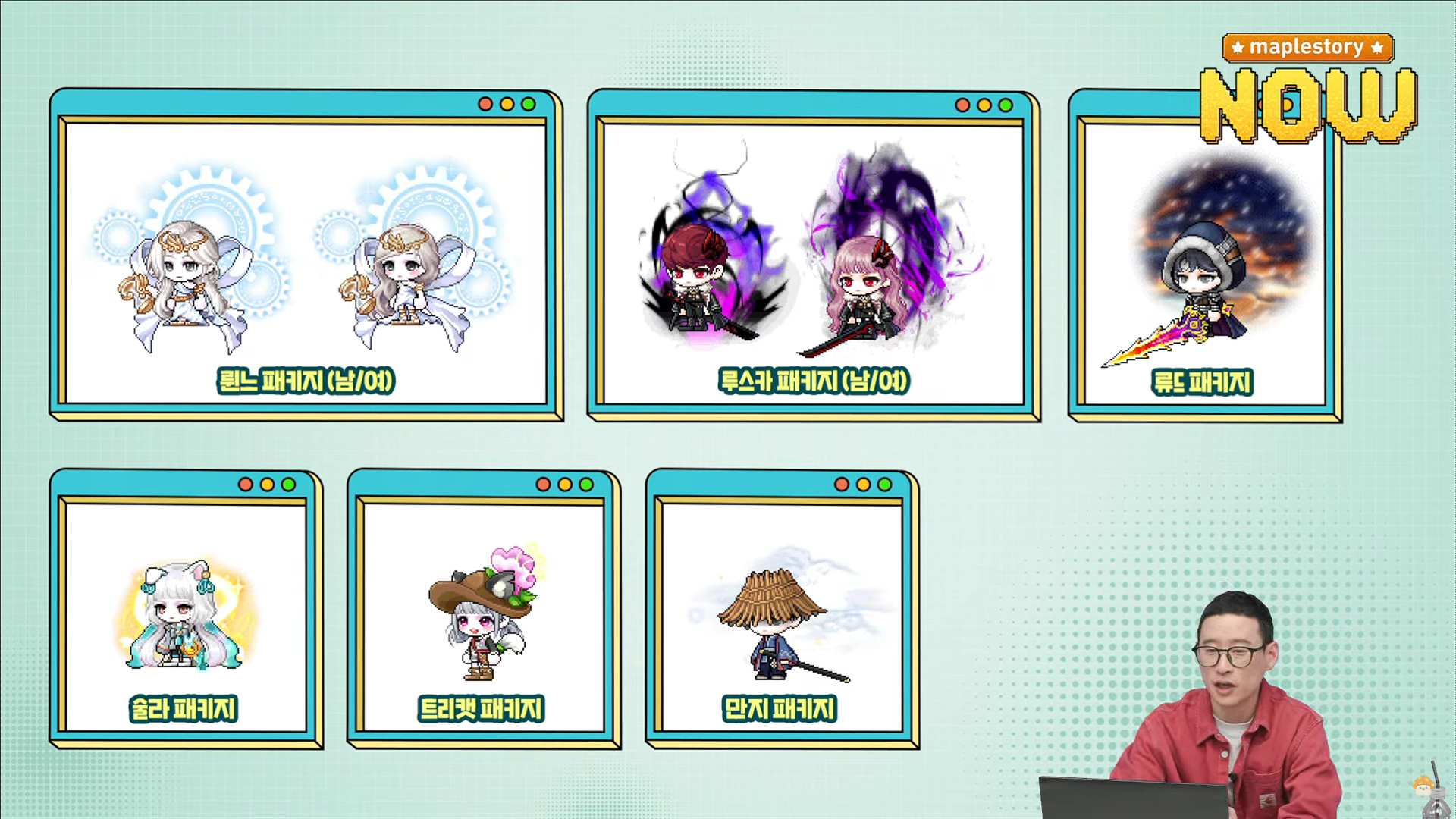
The NPC Style Awards 1st Set Packages will be sold. You can see all of the outfits here.
- Sale Period: January 16, 2025 after the maintenance ~ February 19, 2025 at 11:59 PM.

Bundle Package (47,900 NX)
- NPC Style Awards 1st Set Package: 4 Selective NPC Style Awards 1st Set Package Vouchers
※ You can use the Selective NPC Style Awards 1st Set Package Voucher (expires in 60 days) to choose 1 of the NPC Style Awards 1st Set Packages.
※ The items acquired from the Selective NPC Style Awards 1st Set Package Voucher cannot be paid back.
Individual Packages (14,900 NX)
- Rhinne Package (M)
- Rhinne Package (F)
- Luska Package (M)
- Luska Package (F)
- Ryude Package
- Sula Package
- Treecat Package
- Manji Package
DirectX 11
MapleStory now officially supports DirectX 11.
- DirectX 9 is no longer supported. You can no longer select the DirectX version when you run the game.
- Fixed an issue where an unrecoverable error occurred when using certain Intel graphics cards.
※ If you have any difficulties using the game properly, please update to the latest version of your graphics drivers.
Smart AI Correction
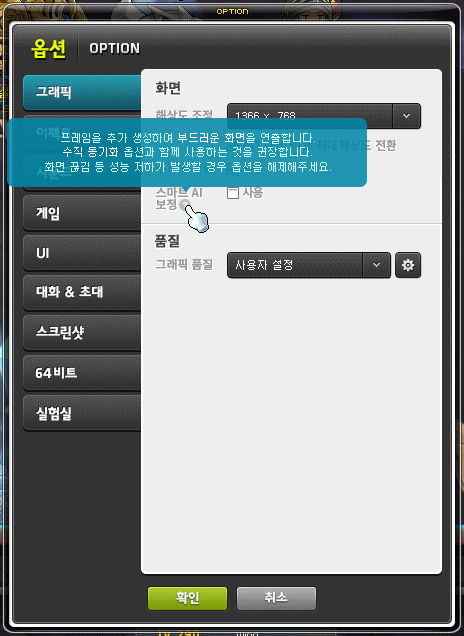
The Smart AI Correction feature has been added.
- This feature creates smoother animations by generating additional frames. Skill effects and actions, and monsters’ movements will be smoother and feel like they move faster.
- The Smart AI Correction can be set in the Options UI’s Graphics tab. It is recommended to use it with the V-Sync option.
- When moving quickly, an issue may occur where letters like in nametags, medals, and titles appear broken.
- If performance degradation such as screen tearing occurs, please disable the option.
- You can see a preview of this feature in the Maple Now stream at this timestamp.
Intense Power Crystal Reorganization
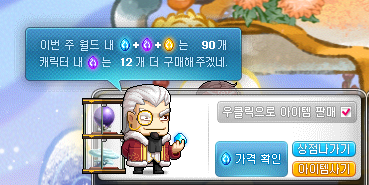
The weekly Intense Power Crystal sell limit per world has been decreased from 180 to 90.
Improvements
Bosses

It has been improved so that you can open the Boss Entry UI by pressing the up arrow key on Chosen Seren, Watcher Kalos, Kaling, and Limbo’s entry gates.
Skills
Hero
- Incising VI’s skill sound effect’s volume has been changed.
Archmage (F/P)
- Fixed an issue where Poison Region’s poison area sometiems was not installed properly.
- It has been improved so that after using Ignite VI, it cannot be cancelled for a certain period of time.
- Fixed an issue where Poison Region VI’s poison area sometiems was not installed properly.
Bishop
- It has been improved so that if Unstable Memorize uses Divine Protection while Divine Protection is applied, a system message will be displayed that indicates the skill cannot be used.
Captain
- Head Shot VI’s skill sound effect’s volume has been changed.
- Death Hail’s skill sound effect’s volume has been changed.
Cannon Shooter
- Support Monkey Twins VI’s duration has been increased by about 3%.
Night Walker
- Darkness Omen:
- It has been improved so that you can re-summon this skill even while it is summoned.
- It has been improved so that you can cancel the skill by right-clicking the skill icon.
- Darkness Omen VI:
- It has been improved so that you can re-summon this skill even while it is summoned.
- It has been improved so that you can cancel the skill by right-clicking the skill icon.
Mercedes
- Unicorn Spike VI’s skill sound effect and skill hit sound effect’s volumes have been changed.
- Gust Dive VI’s skill sound effect’s volume has been changed.
- Strike Dual Shot VI’s skill sound effect and skill hit sound effect’s volumes have been changed.
- Elemental Knights VI’s skill sound effect’s volume has been changed.
Eunwol
- Spirit Frenzy and Spirit Frenzy VI’s action delay has been decreased by about 47%.
Mechanic
- A Distortion Effect Lock feature has been added to Distortion Field VI’s Intense Distortion Field.
- Distortion Field VI’s Intense Distortion Field’s distorition effect will now be affected by skill effect transparency.
Khali
- Hex: Chakram Fury’s skill description has been changed.
- Hex: Chakram Fury VI’s skill description has been changed.
Skill Sequence
In the Quickslots, the cooldown will now be displayed based on the currently applied skill with the longest remaining cooldown.
The cooldown displayed on the shortcut key will now reflect cooldown reduction effects.
When registered as a Skill Alert, the cooldown of disabled skills will no longer be considered.
The help text has been changed.
Link Skills
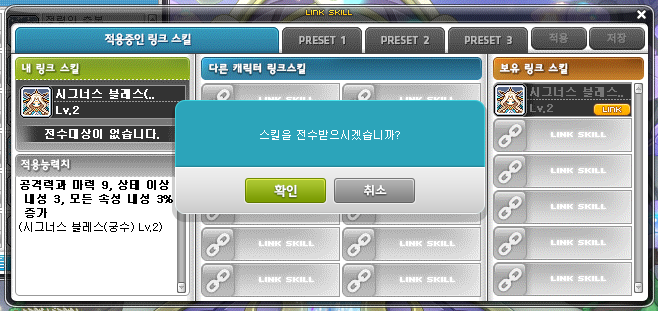
The Link Skill daily transfer limit has been removed.
When transferring Link Skills 5 times or more in a single day, mesos will no longer be consumed.
Link Skill transfers, Link Skill removal, and Link Skill Presets can no longer be used inside boss battle maps.
Noblesse Guild Skills
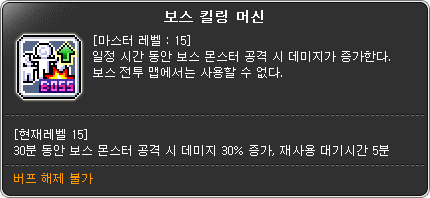
Noblesse Guild Skills’ cooldowns have been changed from 60 minutes to 5 minutes.
- Boss Killing Machine
- Defense is Just a Number
- In the Name of the Guild
- Big One Shot
※ Guild Skills that are on cooldown and were used before the cooldown change will not have the reduced cooldown applied.
When re-using Noblesse Guild Skills, the meso cost has been decreased from 30m to 5m mesos.
Noblesse Guild Skills can no longer be used inside boss battle maps.
Items
You can no longer install Disassemblers in places where only you or your guild members can see them.
- Basic Disassembler
- Intermediate Disassembler
- Advanced Disassembler
- Cube Disassembler
- Scroll Disassembler
The maximum number of Faded Silver Ore, Faded Silver, Clary Sage, and Clary Sage Oil that can be held in 1 inventory slot has been changed to 9000.
It has been improved so that when potential is transferred to Genesis Lazuli/Genesis Lapis and there was no additional potential, additional potential will now be granted.
It has been improved so that 100% Karma Legendary Potential Scroll (Level 200) can now be used on the 2nd stage liberated Genesis Weapon.
The Auto Flight related information has been removed from the Tangerine Snail Riding (Permanent) Voucher and Aurora Bambini Riding (Permanent) Voucher.
NPCs
When talking to the Dreaming Rag Doll or Escaped Rock Spirits NPCs, the options to exchange coins for Arcane Symbols will now only be displayed when you have at least 30 Dream Coins or 3 Spirit Coins respectively,
Maps

Certain Stages in Epic Dungeon: High Mountain have been changed.
- Common Stages
- Solar Flash’s Authority consumption has been decreased from 50 to 30.
- Solar Blade’s Authority consumption has been decreased from 150 to 100.
- Solar Flare’s Authority consumption has been decreased from 200 to 150.
- Stage 4/5
- The number of points required to clear the Stage has been changed from 3,700 to 2,600.
- Certain parts of the Stage 4 map have been changed.
- Stage 7/8
- The number of points required to clear the Stage has been changed from 4,500 to 3,500.
- Stage 10
- The damage inflicted to Tynus by completing the Slaughter phase has been increased from 20% total HP to 30% total HP.

It has been improved so that you no longer need to use the ‘Sit’ key in Protect Esfera when using Shumet’s Special Turret.
- The key used to board Shumet’s Special Turret has been changed from the ‘Sit’ key to the ‘NPC Chat/Harvest’ key.
- The key used to exit Shumet’s Special Turret has been changed frrom the ‘Sit’ key to the left arrow key.
It has been improved so that the Henesys Pet Trail’s exit portal is more visible.
It has been improved so that when using the Magic Rocks to move in Orbis Tower and Eos Tower, it will no longer consume mesos and you can select from all floors.
UI
Certain improvements have been made to the quest related UI’s appearance and features.
- It has been improved so that in Story quests, for high-importance Main and Job quests, they will use separate colours.
- It has been improved so that the Quest UI and Quest Helper UI’s appearances look more natural.
- It has been improved so that if a recently accepted/viewed startable/in-progress quest has been completed, it will no longer be automatically selected when you open the Quest UI.
- It has been improved so that in the Quest UI, the Story quests’ pre-requisite quest filtering feature can be used one at a time.
- It has been improved so that the Story quests’ pre-requisite quest filtering details are saved even if the Quest UI is opened and closed. (However, if a recently accepted or viewed quest does not belong to the filter group, the filtering will be cancelled.)
- It has been improved so that in the Quest UI, the quest objective content is separated by the ‘>’ symbol based on the order of completion conditions.
- It has been improved so that in the Quest UI, the quest objective content will no longer hide the future completion conditions with the ‘?’ symbol.
- It has been improved so that in the Quest UI, the Convenience feature banner area will only function above the button area.
- A guide message has been added if you fail to open the world map through the Quest UI in tutorial maps.
- It has been improved so that even quests without specific completion conditions can be registered and removed from the Quest Helper through the Quest UI.
- It has been improved so that quests that were automatically registered in the Quest Helper are no longer removed after a certain amount of time even if no special actions are taken.
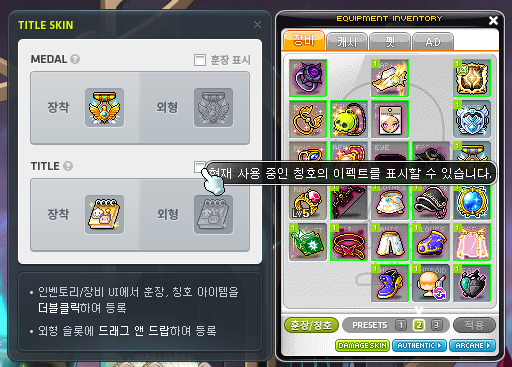
It has been improved so that you can choose to display Medal/Title appearances in the Medal/Title Appearance settings UI.
- You can no longer set this option in the Options UI.
It has been improved so that in the World Map UI, you can now search for region names.
A shortcut key has been added for the Move to Town feature.
- When used, you will move to the town designated as the return point in your current map.
It has been improved so that when using the Import feature in the Shortcut Key Settings UI, you can now also copy the Combination Key’s settings.
When using the Daily Gift rewards’ Mileage items, the process of receiving Mileage has been simplified.
When you try to re-issue a medal that you currently have in your inventory or equipped, you will be notified to check your inventory, equipment window, or equipment presets.
Fixed an issue where after using the Teleport World Map, if you used a Premium Teleport World Map Voucher item while it was on cooldown, the cooldown would not be decreased instantly.
Login Process
It has been improved so that when you connect to the game through the Game Launcher, if the most recently connected account is currently logged in, temporarily blocked, etc., a window to select the Maple ID will be displayed.
It has been improved so that if you try to login to a Maple ID that is currently logged in through the website, you will not be able to connect.
Events
In the Challengers World UI, the <Use Pass> button has been added.
※ You can click the button to use 3,000 Maple Points to complete 1 daily hunting mission that you did not previously complete.
※ The <Challengers Pass> can be used up to the amount of times you did not complete the hunting missions in the previous week as of Thursday at 12:00 AM.
※ However, the number of Challengers Passes that can be used in the last weekk is the number of daily missions that you did not complete as of the day before at 12:00 AM.
In the Challengers Shop, 3x Experience Coupon (30 Minutes) has been added.
※ The 3x Experience Coupon (30 Minutes) can be purchased 1 time per day for 100 Challengers Coins.
※ The 3x Experience Coupon (30 Minutes) can only be put into storage, and will expire in 1 day.
In Challengers World, if you log out while doing the daily hunting mission, a related notification message has been added.
When a Zero character is set as Item Burning, the Challenger’s Equipment set effect can now apply to Lapis and Lazuli.
- If there is no set effect applied to the weapon, when you use the Item Burning Box, the Challenger’s Equipment set effect will be applied to Lapis and Lazuli.
- If another set effect is already applied to the weapon or if you set Item Burning while the Challenger’s Equipment set effect was not applied, you can apply the Challenger’s Equipment set effect by pressing the button in the UI.
- For Zero characters only, a button that lets you apply the Challenger’s Equipment set effect will be displayed in the top left corner of the UI.
※ If the Challenger’s Equipment set effect is currently applied to the weapon, the button will be disabled.
※ If the Challenger’s Equipment set effect is not currently applied to the weapon, the button will be enabled and you can apply the set effect to Lapis and Lazuli by pressing the button.
You can now enter Tera Blink on characters with the Hyper Burning Booster effect applied.
- Regardless of the Hyper Burning Booster effect’s duration, you can only enter Tera Blink during its event period (until March 19, 2025 at 11:59 PM).
※ ‘Spiegelmann’s Brilliant Hat Effect’ and ‘Spiegelmann’s Hat Chair’ can only be acquired 1 time per Hyper Burning MAX and Hyper Burning Booster character per Maple ID.
Fixed an issue where you could not use Final Toss in the <Royal Villa: Hanging Gardens> map.
Pets and Androids will no longer be visible in the <Royal Villa: Hanging Gardens> map.
Nexon OTP
It has been improved so that when Nexon OTP authentication occurs, the authentication reason will now be displayed.
When using ‘Platinum Scissors of Karma’ on an account using Nexon OTP, the OTP authentication number will only have to be entered 1 time after first logging into the world.
※ This feature will be applied from Nexon Play app 4.2.1 and later versions.
Meso Market
It has been improved so that in the Meso Market, when you receive mesos or Maple Points through the ‘Find Mesos & Maple Points’ button, the receipt details will be displayed in the chat window.
If there were any registered transactions in the Meso Market per world before the December 19 maintenance, the existing transactions’ completed amounts and deposits have been refunded.
※ Mesos can be received through the Maple Cabinet.
※ Maple Points will be given out during the maintenance. The refund details can be confirmed in the Maple Cabinet.
Open API
When searching for character actions and emotional expressions in the Character Basic Info search, it has been improved so that you can search for various motions and expressions included in the actions and emotional expressions.
※ The Open API update will be applied after the MapleStory Open API service maintenance (1/16).
Error Fixes
Skills
Common
- Fixed an issue where if a Mastery Core’s skill was disabled due to an SP Reset Scroll, the skill description would display the skill level awkwardly.
- Fixed an issue where if a Core was enhanced while a Mastery Core was disabled, the disabled guide message would be displayed.
- Fixed an issue where certain summon skills’ buff icons would sometimes be displayed even after they disappeared. The changed skills are as follows.
- Common – Decent Holy Fountain
- Bishop – Holy Fountain
- Pathfinder – Obsidian Barrier (Blast), Obsidian Barrier (Transition)
- Wild Hunter – Drill Container, Drill Container VI
- Fixed an issue where if Decent Sharp Eyes acquired from equipment potential was registered as a Pet Auto Buff on jobs other than Adventurers, it would be used continuously even if Sharp Eyes was applied.
- Fixed an issue where if Grandis Goddess’ Blessing was registered in the Skill Alarm, the Skill Alarm would not be displayed even when the cooldown ended.
Hero
- Fixed an issue where Aura Blade VI’s Skill Alarm was not displayed.
- Fixed an issue where Furious Edge’s number of Sword Scars was sometimes not displayed properly.
Dark Knight
- Fixed an issue where you could sometimes use Beholder Shock VI multiple times consecutively.
Archmage (F/P)
- Fixed an issue where after acquiring Ifrit VI, Fury of Ifrit’s skill sound effect was not played properly.
Bishop
- Fixed an issue where Fountain For Angels VI’s effect was displayed awkwardly.
Pathfinder
- Fixed an issue where Cardinal Discharge’s skill description when registered in a quickslot was sometimes not displayed.
- Fixed an issue where Cardinal Blast’s skill description when registered in a quickslot was sometimes not displayed.
- Fixed an issue where Cardinal Transition’s skill description when registered in a quickslot was sometimes not displayed.
- Fixed an issue where Combo Assault VI (Discharge)’s hit sound effect was not played.
- Fixed an issue where Combo Assault VI (Blast)’s hit sound effect was not played.
- Fixed an issue where Combo Assault VI (Transition)’s hit sound effect was not played.
- Fixed an issue where Relic Materialize attacked the totems in Especia’s Totem Slash.
Night Lord
- Fixed an issue where the client would sometimes end when using Four Seasons VI: Rampant.
Shadower
- Fixed an issue where Smokescreen’s effect sometimes looked awkward.
- Fixed an issue where Assassinate VI/Pulverize VI’s damage was sometimes not applied properly.
Captain
- Continual Aiming’s V Core skill icon has been changed.
- Fixed an issue where Rapid Fire VI’s Wild Fire Mode’s skill sound effect would play when in Normal Mode.
Cannon Shooter
- Max Cannon Rainbow’s damage formula has been changed.
Soul Master
- Fixed an issue where if you revived after dying, sometimes some of Soul Eclipse’s effects would disappear.
Night Walker
- Fixed an issue where the client would exit in Heroes of Maple if you used Evan’s Swift of Wind.
- Fixed an issue where Shadow Bats and Ravenous Bats were not summoned continuously by Dominion.
- Fixed an issue where Shadow Bats and Ravenous Bats were not summoned continuously by Dominion VI.
- Fixed an issue where Silence’s Shadow Stars were not activated by Dominion VI.
- Fixed an issue where Dark Sight was cancelled by Abyssal Darkness.
Striker
- Fixed an issue where while using Thunderbolt VI’s Custom Command, if you used Thunderbolt VI with the up arrow key, Thunderbolt Flash would be activated even if Thunderbolt VI was not used.
Aran
- Fixed an issue where after learning Adrenaline Maximum VI’s Ice Storm, the system message would be displayed repeatedly.
Evan
- Fixed an issue where Dive of Thunder VI’s effect was displayed awkwardly.
- Fixed an issue where Zodiac Ray’s magic was not charged at once when Dragon Breath VI hit an enemy.
Mercedes
- Fixed an issue where Elemental Knights and Elemental Knights VI’s spirits were not summoned when Mercedes used skills while in the air.
- Fixed an issue where Elemental Knights VI’s skill sounds were sometimes played continuously.
Eunwol
- Fixed an issue where sometimes the Guardian Spirit was summoned even when Yearning Heart was disabled.
- Fixed an issue where you would move to the left and right during Spirit Frenzy/Spirit Frenzy VI’s cast action.
Battle Mage
- Fixed an issue where Debuff Aura’s debuff effect was sometimes displayed in an awkward location.
- Fixed an issue where Dark Genesis VI: Death Whip’s cast action would sometimes not appear to other characters.
Kaiser
- Fixed an issue where the Morph Gauge would sometimes not be consumed when Final Figuration ended in Epic Dungeon: High Mountain.
Kain
- Fixed an issue where Death Blessing VI HEXA Core’s description was awkward.
Angelic Buster
- Fixed an issue where Da Capo Fettuccia sometimes did not receive the effects of Affinity IV.
Zero
- Fixed an issue where your current Time Force could exceed the maximum if you reset your Hyper Stat DF/TF/PP level.
- Fixed an issue where Beta’s Shadow Flash’s effect sometimes looked awkward.
- Fixed an issue where sometimes summons would awkwardly disappear when casting certain skills. The changed skills are as follows.
- Advanced Throwing Weapon
- Throwing Weapon VI
- Fixed an issue where the character movements were awkward when Tagging right after casting certain skills. The changed skills are as follows.
- Jumping Crash
- Earth Break
- Jumping Crash VI
- Earth Break VI
- Level 40 Wind Strike/Jumping Crash and Storm Break/Earth Break has been added to the Wind Cutter VI/Giga Crash VI Mastery Core activation conditions.
- Fixed an issue where casting Shadow Rain VI, Time Force would be consumed after the skill ended.
- Fixed an issue where sometimes Infinite Resonance activated when Transcendent’s Blessing of Time’s afterimage attacks were cast.
Illium
- Fixed an issue where after the Crystal was summoned with Crystal Control, if you entered a map that removed buffs, the buff icon would not disappear.
- Fixed an issue where Craft: Javelin VI’s Crystal Shards sometiems did not appear on the buff icon.
- Fixed an issue where Longinus VI was displayed awkwardly to other characters.
Khali
- Fixed an issue where you could be knocked back by enemy attacks during Hex: Chakram Fury VI’s cast action.
Hoyoung
- Fixed an issue where Scroll: Absorbing Vortex VI/Scroll: Butterfly Dream VI HEXA Core’s description was awkward.
Skill Sequence
Fixed an issue where the Shortcut Key setting’s Sqeuence Key could be registered in the Combination Key.
Fixed an issue where certain HEXA Mastery Core skill names were displayed incorrectly in the message displayed when a Skill Sequence could not be used.
Fixed an issue in the Skill Sequence UI where even if Ring Activation was registered in a Skill Sequence, the Ring Activation icon at the bottom would still sppear as though it could be registered.
Fixed an issue where if a Skill Sequence was registered in the Skill Alarm, if the Skill Sequence became unusable, it could not be changed On/Off in the Skill Alarm.
Fixed an issue where if Unstable Memorize and Infinity were registered in the Skill Sequence in that order, Infinity would not be used.
Fixed an issue where if all skills registered in a Skill Sequence came off cooldown when you first connected to the client and it was the first character you logged into, the Skill Alarm would not be displayed.
Fixed an issue where if you registered a Skill Sequence in the Skill Alarm after using it, when all of the skills registered in the Skill Sequence came off cooldown, the Skill Alarm would not be displayed.
Fixed an issue where if Ring Activation was registered in a Skill Sequence then used individually, when all of the skills registered in the Skill Sequence came off cooldown, the Skill Alarm would not be displayed.
Fixed an issue where sometimes the client would exist when changing channels or changing boss battle phases while the Skill Sequence UI was open.
Fixed an issue where if Lucky Dice was included in a Skill Sequence, the cooldown would not be displayed on the Skill Sequence shortcut key.
Fixed an issue where if Grandis Goddess’ Blessing was included in a Skill Sequence, the cooldown would not be displayed on the Skill Sequence shortcut key.
Fixed an issue where if you registered 2 or more Special Skill Rings in a Skill Sequence then used it, the Skill Sequence shortcut key would not display the cooldown when changing Special Skill Rings.
Fixed an issue where if you changed maps while the Skill Sequence preview UI was displayed, the Skill Sequence preview UI would remain awkwardly.
Fixed an issue where if you hovered over a Skill Sequence shortcut key registered in the Combination Key, the Skill Sequence preview UI would not be displayed.
Fixed an issue where sometimes even if all of the skills registered in a Skill Sequence came off cooldown, the Skill Alarm would not be displayed.
Fixed an issue where if you registered a Skill Sequence in the Skill Alarm, used the SKill Sequence, then changed maps, even if all of the skills registered in the Skill Sequence came off cooldown, the Skill Alarm would not be displayed.
Fixed an issue where if Hero registered Sword of Burning Soul in a Skill Sequence then used it, Sword of Burning Soul’s cooldown was not displayed in the Skill Sequence shortcut key.
Fixed an issue where if Bishop used Memoriy Choice to change the skill that would be activated by Unstable Memorize, sometimes the list of registerable skills at the bottom of the Skill Sequence UI looked awkward.
Fixed an issue where if Bishop registered Triumph Feather, Holy Blood, or Triumph Feather VI in a Skill Sequence then changed to Compassion Mode and they were disabled, the Skill Sequence could be used even if it had lass than 3 registered skills excluding those skills.
Fixed an issue where if Phantom swapped their stolen skill, the cooldown would not be displayed in the Skill Sequence shortcut key.
Fixed an issue where if Phantom registered a stolen skill in a Skill Sequence, when all of the skills registered in the Skill Sequence came off cooldown, the Skill Alarm would not be displayed.
Fixed an issue where even if Zero used a Skill Sequence while using Wheel Wind/Wheel Wind VI, the skills would not be cancelled.
Quests
Fixed an error where the ‘[Lion King’s Castle] Defeat the Lion King’ quest could not be completed in certain conditions.
Fixed an issue where the ‘[Esfera] In Search of Tana’ quest could not be restarted after forfeiting it.
Fixed an issue where the ‘Black Mage’s Binding’ debuff applied when doing the ‘[Genesis Weapon] Following the Traces of the Black Mage’ quest would not be removed if you left by leaving the party while fighting Von Leon.
Fixed an issue with the ‘[Masterpiece] Night Angelo’ and ‘[Masterpiece] Night Angela’ quests where if your Cosmetic inventory was full during the completion reward acquisition stage, you would not receive the reward even if your Cash inventory was empty.
Items
Fixed an issue where you could not acquire Black Crystal items from the Suspicious Mineral Pouch.
Fixed an issue where if you used a Mysterious Anvil on a Genesis Soul Shooter, it would appear as if the Yaldabaoth of Destruction skill was not applied when checking the Combat Power of other characters with that weapon equipped.
Fixed an issue with Zero where sometimes the Assisted Zero’s cape was not displayed when an Assist was activated.
Fixed an issue where the Luna Petite Water of Life’s duration was applied incorrectly in certain situations.
Fixed an issue where if the Tallahart area’s Elite Monsters and Elite Bosses were registered by using a Mystery Monster Egg, the message would not include the prefixes.
Fixed an issue where the Maple Lover medal and the Maple 3000 Days medal could not be reissued.
Fixed an issue where the Karianne Cape and Dunkel Cape item tooltips did not include the message ‘This item is not visible in certain situations, such as in the Character Info window.’
Fixed an issue where the Premium Teleport World Map [31 Days] Usage Voucher from the MVP Special Pack was provided as untradable.
Fixed an issue where the Premium Teleport World Map [1 Day] Usage Voucher from the MAPLE Daily Gift was provided as untradable.
The Return to Nearest Town Scroll’s item tooltip has been changed to match the specifications.
You can no longer acquire the Teleport World Map item from the Sprout Box.
Fixed an issue where scissor count was displayed on certain items with the Binding Mark applied.
Fixed an issue where the Maple Gold Coins acquired from the Epic Dungeon clear rewards and bonus rewards expired after 30 days. They have been changed to expire in 7 days.
Monsters
Fixed an issue where you could sometimes deal damage to Balrog (Easy) within 3 minutes of entering.
Fixed an issue where characters level 85~119 could not enter Hilla (Normal).
Fixed an issue where certain screen effects looked awkward in Papulatus (Easy/Normal/Chaos) when the ‘optimal ratio’ was applied to the UI size.
Fixed an issue where characters level 140~159 could not enter Pink Bean (Normal).
Limbo (Normal/Hard)
- Fixed an issue in Phase 3 where if the Inner Source pattern started while Illium was using Crystal Skill: Glory Wings, the flight would not function properly.
- Fixed an issue in Phase 3 where sometimes even if you were hit by the Grasping Hands or the Back Predator, the status effect would not be applied.
Fixed an issue where the Fantasy Flower’s HP bar displayed was different than its actual HP when it appeared in non-instanced maps.
Fixed an issue where the ‘Scattered Sol Erda’ monsters that appeared from the HEXA Booster affected the conditions for Elite Monster appearance.
Maps
Fixed an issue in certain Hotel Arcs maps where if the character jumped from the lowest platforms, they would appear to be hidden behind the platform.
- Outlaw Infested Wastes 1
- Outlaw Infested Wastes 2
- Outlaw Infested Wastes 3
- Outlaw Infested Wastes 4
- Nostalgic Drive-In Theater 1
- Nostalgic Drive-In Theater 2
- Nostalgic Drive-In Theater 3
- Nostalgic Drive-In Theater 4
- Nostalgic Drive-In Theater 5
- Nostalgic Drive-In Theater 6
Fixed an issue in certain Hotel Arcs maps where platforms and map objects were awkward.
- Outlaw Infested Wastes 4
- Nostalgic Drive-In Theater 4
- Nostalgic Drive-In Theater 5
- Nostalgic Drive-In Theater 6
Fixed an issue where the Navigation guide did not work between certain continents.
Fixed an issue in Epic Dungeon: Angler Company Stage 2 where a platform was broken.
Fixed an issue where if you entered the Audience Room through Lion King’s Castle – Castle Walls 2, you would be moved to the Fourth Tower after exiting.
Fixed an issue where characters currently progressing through the Arcane River story could not exit certain content maps.
Fixed an error where the quest start icon appeared in boss maps.
- Guardian Angel Slime
- Lucid
UI
Fixed an issue where if there was still a clear count remaining within the world for Monster Park Extreme, it would not be displayed as cleared in the Boss UI even if you did clear.
In the Maple Chat, characters that exited will no longer display ‘Message being entered’.
Fixe an issue in the HEXA Matrix where the guide message for materials required was displayed on Cores that were completely enhanced.
Fixed an issue in Azmoth Canyon where in certain stages, the Stage UI covered the Minimap UI.
Fixed an issue in certain situations where if you bought Royal Style items, the item preview would not be displayed.
Fixed an issue in the Maple Auction where pets applied with the Luna Illusion looked awkward in the Preview.
Fixed an issue in the Maple Auction where if you tried a new search, the existing set sort options would be maintained.
Fixed an issue in the Maple Auction where if you used the Quick Search in the Search or Market Price tabs, the search waiting time was shared.
Fixed an issue in the Maple Auction when using Quick Search where the auto-complete feature did not work when using the Space Bar.
Fixed an issue in the Maple Guide where you could not move to Esfera using the Protect Esfera button.
Fixed an issue where the Maple Guide’s Quick Move Maps would be activated even if you did not complete the pre-requisite quests and could not use them.
Fixed an issue in the Quest UI’s Search window where if you did not have any text entered, the Close button on the right side wowuld faintly overlap.
Fixed an issue where the Quest UI would not be closed with the ESC key if you registered or unregistered a quest in the Quest Helper through the Quest UI.
Fixed an issue in the Quest UI where certain quests’ reward information displayed different amounts than actually rewarded.
Fixed an issue where the Quest Helper sometimes did not minimize even when there were no registered quests.
Fixed an issue in the Quest Helper where registered quests’ mouse click and hover over ranges were awkward.
Fixed an issue where quests that were not registered in the QUest Helper could not be re-registered even if they were not completed.
Fixed an issue where Dual Blade characters that completed the 1st job advancement were not included in the Dual Blade job series in the Character Select window’s Job Growth status.
Fixed an issue where Smartphone alerts and related UI did not appear when doing the FriendStory quests.
Fixed an issue where the World Map UI’s Search window’s Search button was displayed awkwardly.
Fixed an issue where if you cleared Epic Dungeon: High Mountain, the Quick Pass button would say that you already cleared Angler Company.
Fixed an issue where if the Buff Auto Sort feature was applied, hovering over certain buff icons’ bottom areas would not display the tooltips.
Fixed an error where if you tried to login to the same account at the same time, the Union attacker information would not be loaded intermittently.
Fixed an error where if you registered a medal item that had its appearance changed with a Mysterious Anvil as your Medal Appearance, other characters would see the medal’s original appearance instead of its anvilled appearance.
Fixed an issue in the New Name Auction where if 2 or more people attempted to bid at the same time, sometimes the guide message would not be displayed to bidders other than the first one.
Fixed an issue in the Cash Shop where the Cash Purchase confirmation window’s tooltip would intermittently not be displayed againd.
Fixed an issue where a tooltip would be displayed if you hovered over the blank space at the bottom of the Character Info UI when changing your Custom Background.
Fixed an issue in the Maple Auction where Cash items purchased through cross-world trades would display incorrect tooltip information in the Cash storage.
Achievements
Fixed an issue where achievements related to defeating field bosses did not count Temple of Time area’s Dodo, Lilynouch, Lyka, Mu Lung area’s Mu Gong, Master Dummy, Giant Bellflower Root, and Road of Vanishing area’s Arma.
- [Field Boss] Defeating Rare Enemies
- [Field Boss] Defeating Many Rare Enemies
- [Field Boss] Defeating So Many Rare Enemies
Meso Market
Fixed an issue where if the date changed, if you requested a trade, the number of possible trades was displayed incorrectly.
Fixed an error where goods were intermittently paid in smaller amounts than the actual completed transaction amount.
※ For accounts that experienced this error, the unpaid goods will be paid sequentially through the Maple Cabinet after the maintenance.
Events
Burning Express
Boosted firepower! Accelerated growth! Experience even faster growth with the Burning Express!
Event Participation Requirements:
- Level 101 or higher characters (or a Zero character that has completed story quest Chapter 2).
Event Period:
- February 6, 2025 at 10:00 AM ~ February 19, 2025 at 11:59 PM.
You can select the ‘Burning Express’ event in the Event List and click the ‘Participate’ button or talk to Maple Admin to start the event.
Every day, after defeating 1,000 monsters within your level range, you can click the ‘Attendance Check’ button in the Burning Express UI to complete the daily attendance check.
You can acquire growth rewards based on the number of days you complete. All growth rewards can be claimed at any time you choose until the event period ends.
If you click the ‘Use’ button at the bottom left of the Burning Express UI, you can use the <Burning Pass>. It will consume 3,000 Maple Points to complete 1 attendance check that you did not complete before.
If you click the <Flame Pass> button at the middle of the Burning Express UI, you can consume 29,900 Maple Points to use the <Flame Pass>. This lets you acquire additional growth rewards based on the number of days you completed the attendance check.
※ The attendance check will only count if you defeat monsters within your level range while you are in a party of 1 or are not in a party. You can complete it up to 10 times during the event period.
※ The attendance check progress and reward acquisition records are shared per Maple ID.
Basic Attendance Check Rewards
You can acquire the following growth rewards based on the number of attendance check completions.
| Days | Reward | Quantity |
|---|---|---|
| 1 | VIP Booster | 5 |
| 2 | VIP Booster | 5 |
| 3 | VIP Booster | 5 |
| 4 | VIP Booster | 5 |
| 5 | Advanced EXP Voucher | 2,000 |
| 6 | VIP Booster | 5 |
| 7 | VIP Booster | 5 |
| 8 | VIP Booster | 5 |
| 9 | VIP Booster | 5 |
| 10 | Sol Erda | 2 |
※ All basic attendance check rewards can only be put into storage.
※ All rewards can be claimed until February 19, 2025 at 11:59 PM. They will expire on February 20, 2025 at 2:00 AM.
※ The Advanced EXP Vouchers can only be used on characters level 260 or higher. Level 260 or higher Zero characters must complete Chapter 2.
※ The Sol Erda can only be used by characters level 260 or higher that have completed the 6th job advancement.
Flame Pass Attendance Check Rewards
When you use the Flame Pass by consuming 29,900 Maple Points, you can acquire the following additional rewards based on the number of attendance check completions.
When you buy the Flame Pass, you can also acquire Flame Pass rewards for attendance check days you already completed beforehand. However, even if you buy it, you cannot acquire rewards for days that you did not complete the attendance check for.
| Days | Reward | Quantity |
|---|---|---|
| 1 | VIP Booster | 5 |
| 2 | VIP Booster | 5 |
| 3 | VIP Booster | 5 |
| 4 | VIP Booster | 5 |
| 5 | Advanced EXP Voucher | 2,000 |
| 6 | VIP Booster | 5 |
| 7 | VIP Booster | 5 |
| 8 | VIP Booster | 5 |
| 9 | VIP Booster | 5 |
| 10 | Sol Erda | 2 |
※ All Flame Pass attendance check rewards can only be put into storage.
※ All rewards can be claimed until February 19, 2025 at 11:59 PM. They will expire on February 20, 2025 at 2:00 AM.
※ The Advanced EXP Vouchers can only be used on characters level 260 or higher. Level 260 or higher Zero characters must complete Chapter 2.
※ The Sol Erda can only be used by characters level 260 or higher that have completed the 6th job advancement.
Dawn Star Banquet
Dawn Star Fountain
There is a beautiful fountain in the Hanging Gardens that is said to bring good luck if you throw a coin in it. Keep the lucky fountain clean and acquire Commemoration Coins and Challengers Coins!
Event Participation Requirements:
- A level 101 or higher character (or a Zero character that has completed story quest Chapter 2) that has participated in the ‘Dawn Star Banquet Dinner Party’ event.
Event Period:
- January 16, 2025 after the maintenance ~ February 5, 2025 at 11:59 PM.

You can select the ‘Dawn Star Fountain’ event in the Event List and click the ‘Participate’ button or talk to the Attendant in <Hanging Gardens> to start the event.

Every day, after defeating 1,000 monsters within your level range, you can clean the Dawn Star Fountain and acquire Commemoration Coins based on your number of participations.
※ The Dawn Star Fountain cleaning will only count if you defeat monsters within your level range while you are in a party of 1 or are not in a party.
※ The attendance check progress and reward acquisition records are shared per Maple ID.
You can clean the Dawn Star Fountain up to 15 times during the event period.
If you click the <Use> button at the top of the Dawn Star Fountain UI, you can use the <Fountain Pass>. It will consume 3,000 Maple Points to complete 1 attendance check that you did not complete before.
Commemoration Coins
When you finish cleaning the Dawn Star Fountain or use the Fountain Pass, you can acquire Commemoration Coins based on your cumulative number of participations.
| Cumulative Participations | Number of Commemoration Coins Acquired |
|---|---|
| 1 | 500 |
| 2 | |
| 3 | |
| 4 | |
| 5 | 1000 |
| 6 | 500 |
| 7 | |
| 8 | |
| 9 | |
| 10 | 1000 |
| 11 | 500 |
| 12 | |
| 13 | |
| 14 | |
| 15 | 2000 |
※ The Commemoration Coins acquired are shared between all characters within the Maple ID. You can check them through the ‘Dawn Star Banquet Dinner Party’ UI.
Challengers Coins
In Challengers World, you can acquire additional Challengers Coins based on your cumulative number of participations.
| Cumulative Participations | Number of Challengers Coins Acquired |
|---|---|
| 1 | 250 |
| 2 | |
| 3 | |
| 4 | |
| 5 | 500 |
| 6 | 250 |
| 7 | |
| 8 | |
| 9 | |
| 10 | 500 |
| 11 | 250 |
| 12 | |
| 13 | |
| 14 | |
| 15 | 1000 |
※ The Challengers Coins can only be claimed in Challengers World. They can only be claimed if you have participated in the ‘Challengers Missions’ event within the world.
※ The Challengers Coins acquired are shared between all characters within the world. You can check them through the ‘Challengers World’ UI.
Heart-Pounding Broomy’s Deep Cleaning

Help Broomy clean up and gain experience! If you help her clean up, you might get something good sometimes…?
Event Participation Requirements:
- A level 101 or higher character (or a Zero character that has completed Chapter 2) that has participated in the ‘Dawn Star Banquet Dinner Party’ event.
Event Period:
- 1st Period: January 16, 2025 after the maintenance ~ February 12, 2025 at 11:59 PM.
- 2nd Period: February 13, 2025 at 12:00 AM ~ February 19, 2025 at 11:59 PM.

Based on each event period, you can select the ‘Heart-Pounding Broomy’s Deep Cleaning’ event in the Event List and click the ‘Participate’ button or talk to Broomy at the <Royal Villa: Hanging Gardens> to acquire the ‘Heart-Pounding Cleaning Time’ skill.
- 1st Period: Heart-Pounding Broomy’s Deep Cleaning
- 2nd Period: Heart-Pounding Broomy’s Final Deep Cleaning
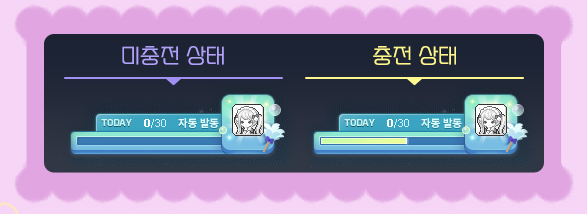
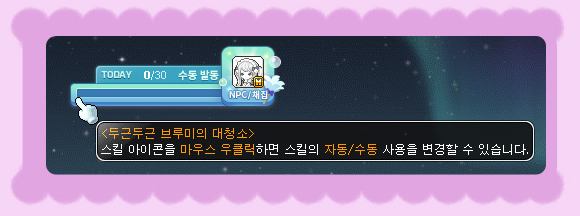
When you enter a hunting ground with monsters within your level range, the ‘Heart-Pounding Cleaning Time’ skill will be automatically activated. As you defeat monsters within your level range, you will fill up the gauge.
※ However, defeating monsters that appear when you use VIP Boosters or HEXA Boosters will not be reflected in the Gauge.
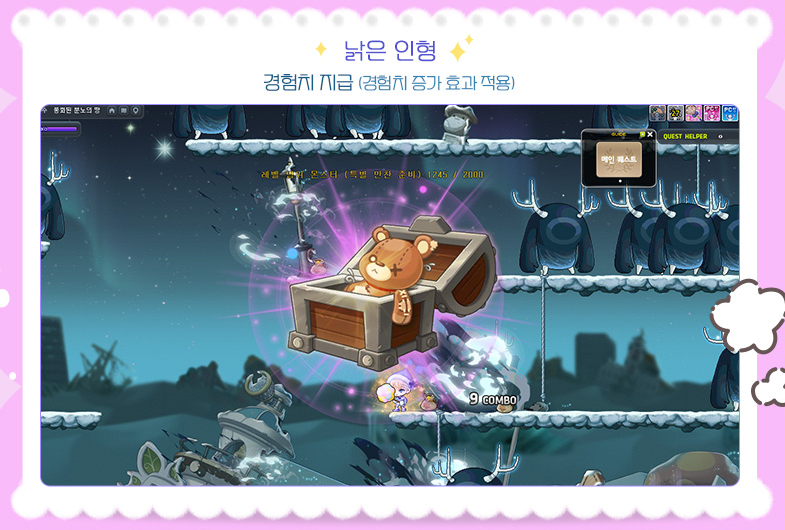
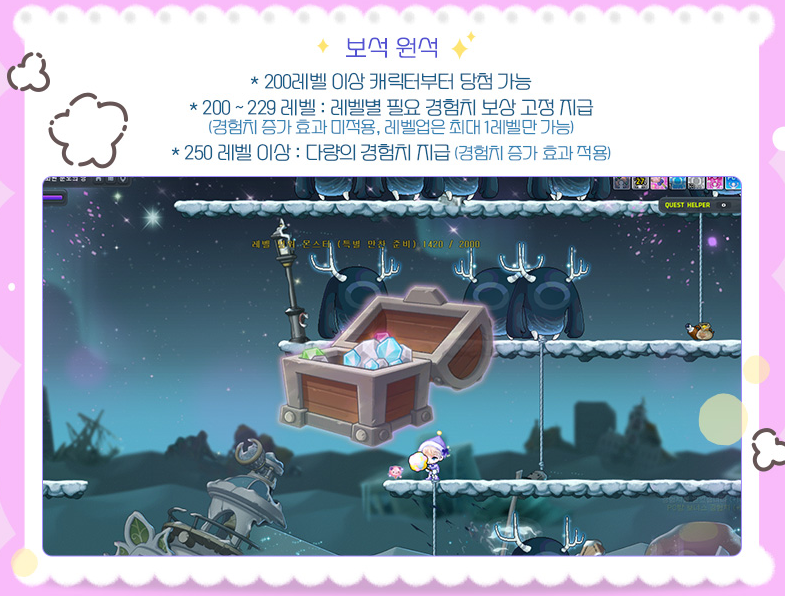

When you defeat 250 monsters within your level range, the gauge will be filled and ‘Heart-Pounding Broomy’s Deep Cleaning’ will be activated and you will acquire experience. When ‘Heart-Pounding Broomy’s Deep Cleaning’ activates, Broomy will clean up here and there to attack nearby enemies.
When participating in the ‘Heart-Pounding Broomy’s Final Deep Cleaning’ event, the experience acquired will be increased.
Based on the number of times that ‘Heart-Pounding Broomy’s Cleaning Time’ is activated, you can win one of the ‘Old Doll’, ‘Jewel Ore’, or ‘Ancient Relic’ at a set rate to acquire experience based on the result.
| Event | Number of ‘Heart-Pounding Broomy’s Deep Cleaning’ Skill Activations |
|---|---|
| Heart-Pounding Broomy’s Deep Cleaning | The 30th time the skill is activated, you have a chance to win one of the rewards from ‘Old Doll’, ‘Jewel Ore’, or ‘Ancient Relic’. |
| Heart-Pounding Broomy’s Final Deep Cleaning | The 10th/20th/30th time the skill is activated, you have a chance to win one of the rewards from ‘Old Doll’, ‘Jewel Ore’, or ‘Ancient Relic’. |
The experience given from each are as follows.
| 30th Activation Fever Type | Level | Experience |
|---|---|---|
| Old Doll | No limit | Basic amount of experience provided. |
| Jewel Ore | Level 200~229 | Fixed amount of experience required for 1 level up. |
| Level 230 or higher | Experience equal to hunting for 1 hour. | |
| Ancient Relic | Level 200~249 | Fixed amount of experience required for 1 level up. |
| Level 250 or higher | Experience equal to hunting for 8 hours. |

※ If you use all 30 ‘Heart-Pounding Cleaning Time’ activations per day per character, the skill will be deactivated.
※ You can deactivate the ‘Heart-Pounding Cleaning Time’ skill by right-clicking the skill icon in the skill window. If the skill is deactivated, it will remain deactivated until midnight or until you right-click the skill to activate it again. If you disconnect and reconnect, the deactivated skill will be reactivated.
※ You can right-click the skill icon in the UI to select ‘Heart-Pounding Broomy’s Deep Cleaning’ skill’s Auto or Manual Use Mode.
※ The ‘Heart-Pounding Cleaning Time’ skill will only activate in maps with monsters within your level range. It will not activate in maps where there is a level 4 Rune debuff or other special maps (Mirror World, story quest maps, etc.).
※ If you fill up the gauge on a map where another player is activating ‘Broomy’s Deep Cleaning’, the activation will be delayed until the already activated skill is complete.
※ In instanced maps, ‘Broomy’s Deep Cleaning’ will be activated instantly, regardless of whether or not other players have already activated the skill.
※ The ‘Broomy’s Deep Cleaning’ skill is only visible to yourself and is affected by experience increasing effects and the death penalty experience reduction effect.
※ The ‘Heart-Pounding Cleaning Time’s ‘Jewel Ore’ and ‘Ancient Relic’ can only activate on characters level 200 or higher.
※ If you win the ‘Heart-Pounding Cleaning Time’s ‘Jewel Ore’, characters level 200 or higher and below level 229 will gain a fixed amount of experience that is not affected by experience acquisition increasing effects.
※ If you win the ‘Heart-Pounding Cleaning Time’s ‘Jewel Ore’, characters level 230 or higher will gain an amount of experience that is affected by experience acquisition increasing effects and the death penalty experience reduction effect.
※ If you win the ‘Heart-Pounding Cleaning Time’s ‘Ancient Relic’, characters level 200 or higher and below level 249 will gain a fixed amount of experience that is not affected by experience acquisition increasing effects.
※ If you win the ‘Heart-Pounding Cleaning Time’s ‘Ancient Relic’, characters level 250 or higher will gain an amount of experience that is affected by experience acquisition increasing effects and the death penalty experience reduction effect.
※ ‘Heart-Pounding Cleaning Time’s ‘Ancient Relic’ can only be acquired 1 time per day.
※ Experience acquired through ‘Heart-Pounding Cleaning Time’ can only level you up 1 time.
※ Monsters defeated by ‘Broomy’s Deep Cleaning’ will not accumulate the 250 monsters required for the next skill activation.
MapleStory M Link Event – Lara Level Achievements

Create the new character Lara in MapleStory M and receive cool rewards when you reach specific levels!
Event Participation Requirements:
- A level 101 or higher character (or a Zero character that has completed story quest Chapter 2).
Event Period:
- January 16, 2025 after the maintenance ~ February 19, 2025 at 11:59 PM.
You can select the ‘[MapleStory M Link Event] Lara Level Achievements’ event in the Event List and click the ‘Participate’ button to start the event.
If you create a Lara in MapleStory M and reach certain levels, you can receive the following gifts.


| Acquisition Condition | Reward | Items Acquired When Used |
|---|---|---|
| Reach Level 160 on Lara | Lara Level 160 Achievement Gift | Narin’s Guardians! Chair (Permanent) |
| Reach Level 180 on Lara | Lara Level 180 Achievement Gift | Lara Damage Skin (7 Days) |
| Reach Level 200 on Lara | Lara Level 200 Achievement Gift | 2 Sol Erda (7 Days) |
※ The rewards can only be claimed 1 time per Nexon ID.
※ The items acquired when you use the Lara Level Achievement Gifts can only be put into storage.
Henesys Yutnori Competition

Henesys’ Chief Stan has prepared a Yutnori competition for the Lunar New Year holiday. Participate in the competition, stack up your wins, and receive rewards!
Event Participation Requirements:
- A level 101 or higher character (or a Zero character that has completed story quest Chapter 2).
Event Period:
- January 23, 2025 at 10:00 AM ~ February 5, 2025 at 11:59 PM.

You can select the ‘Henesys Yutnori Competition’ event in the Event List and click the ‘Participate’ button or talk to Chief Stan in Henesys to start the event.
The ‘Henesys Yutnori Competition’ will take place with ‘Supernatural Yutnori’. You can participate in either matching or party play. In party play, you can participate in a party of 2 people. If you participate in Supernatural Yutnori as a party, you will not accumulate your ‘daily participation count’ or ‘win count’.
There is no limit on the number of times you can participate in Supernatural Yutnori. You can accumulate your ‘daily participation count’ once per day, regardless of if you won or lost.
If you win in Supernatural Yutnori, you can accumulate your ‘win count’ over the event period.
You can acquire rewards based on your accumulated ‘daily participation count’ and ‘win count’.
※ The ‘daily participation count’ and ‘win count’ are shared within the world.
※ If you exceed your time limit 5 times and are kicked out, or leave the game while playing, you will not accumulate ‘daily participation count’ or ‘win count’.
| Reward | Acquisition Conditions | Acquisition Limit |
|---|---|---|
| Henesys Yutnori Competition Chair | Participate 1 time. | 1 time per world. |
| Yut After Yut Weapon Voucher | Participate 5 times. | |
| Master of Yutnori Medal Voucher | Win 20 times. |

The ‘Henesys Yutnori Competition Chair’ will display your number of wins. Even after acquiring the chair, you can continue to stack up your ‘win count’.
※ If you World Leap, your accumulated ‘daily participation count’ and ‘win count’ will be changed to those of the world you leap to.
New Name Auction

A chance to get the name you want! Try using Mister New Name’s New Name Auction!
Event Participation Requirements:
- A level 101 or higher character (or a Zero character that has completed story quest Chapter 2).
※ You can use the New Name Auction in Challengers World too.
Event Period:
- January 23, 2025 at 10:00 AM ~ February 12, 2025 at 11:59 PM.
※ You can register character names for sale until February 9, 2025 at 11:59 PM.
You can select the ‘New Name Auction’ event in the Event List and click the ‘Participate’ button or talk to Mister New Name in main towns to enter the New Name Auction.
New Name Auction
After entering, you can proceed with the character name auction. The New Name Auction can be used on a per Maple ID basis, and you use Maple Points in the auction.
- You can only sell or bid on character names on Green PCs.
- When registering a name for sale, you can choose between 8 hours, 24 hours, and 48 hours for the auction’s duration.
- You can only sell 1 character name at a time. You can only be trading up to 10 names at a time, including selling, bidding, and unclaimed completed trades.
- In an auction, you can bid on a name with a price higher than a certain amount than the currently registered highest bid.
- The minimum bid amount depends on the current highest bid.
- The auction will end between 2 minutes before and 2 minutes after the specified auction end time. When it ends, the highest bidder will win the character name.
- Completed trade details are stored until July 12, 2025 at 11:59 PM, and will be automatically deleted if the name and payment are not claimed during this period.
- After the event ends, you can claim your names and payment through the NPC Mister New Name.
※ Character names that violate the name policy are subject to sanctions, and they may be sanctioned when attempting to trade them.
※ Selling character names is only available to characters that have been created at least 90 days ago.
※ Characters who have changed names within 1 week cannot sell their names.
※ After a new name is received through the New Name Auction, that character cannot change its name through Mister New Name for 1 week.
※ Regardless of the time that the character’s name was changed, you can receive names you have won in the New Name Auction or return unsold character names.
※ Reselling character names won during the event is prohibited.
※ Selling and bidding cancellations due to changing your mind are not possible. Character names cannot be restored after a trade has concluded.
Hyper Burning Booster
Infinite growth with 1+4 level ups until level 260! Meet the Hyper Burning Booster with powerful benefits.
If you have fully completed the Dawn Star Banquet Dinner Party’s Special Dinner Party Preparations 24 times, you can acquire a Hyper Burning Booster.
Hyper Burning Booster Usage Requirements:
- A level 10~258 character that is not currently a Hyper Burning MAX character.
- A level 200~258 Zero character that is not currently a Hyper Burning MAX character and has completed story quest Chapter 2.
Hyper Burning Booster Usage Effects
- When you use the Hyper Burning Booster, the 1+4 level up Burning effect will be applied.
- The effect will be applied from level 10~260, for 90 days from the day it was used.
- When used on a character that is receiving the Tera Burning or Mega Burning effects, that character’s Tera Burning/Mega Burning effect will disappear.
- If you delete a character that is receiving the Hyper Burning Booster effect, it will disappear.
Hyper Burning Booster Character benefits
When you use the Hyper Burning Booster on an existing character, you will only receive the rewards for the levels you reach after you used the Hyper Burning Booster.
Hyper Burning Booster characters will receive the following rewards through the Hyper Burning Booster UI when they reach certain conditions.
| Acquisition Conditions | Rewards |
|---|---|
| Burning Effect Applied | – Mysterious Secret Box (7 Days) -Snail Pet (30 Days, cannot be extended) – Legendary Secret Box (Level 100 or higher) – Black Set Armor (Hat, Overall, Cape) – Black Weapon Box – Black Secondary Weapon Box – Time-Limited Root Abyss Set Box (Can be used at level 150 or higher) – 15 Star Root Abyss Set Armor (Hat, Top, Bot) – Equipment is scrolled with 70% Scrolls of the selected stat. – Set potential of 6%/3%/3%. – 15 Star Time-Limited Fafnir Weapon Box – Weapon is scrolled with 70% Scrolls of the selected stat. – Set potential of 6% attack/magic attack/3% damage/4% critical rate. – All acquired equipment is untradable and will expire in 90 days. – Eternal Flame Title Voucher – Can be used at level 200 or higher after completing the 5th job advancement and the ‘Another Power, Arcane Force’ quest. – The Eternal Flame title acquired from the Voucher will expire in 60 days. – Eternal Flame Ring Voucher – Provided with Unique potential. – Cannot be acquired if you already hold an Eternal Flame Ring. ※ The reward items are untradable and will expire in 90 days. |
| Reach Level 200 | – Level 7 Arcane Symbol: Road of Vanishing (untradable, permanent) – 100 Core Gemstones (untradable, expires in 90 days) – Trait Growth Potion (untradable, expires in 90 days) |
| Reach Level 210 | – Level 7 Arcane Symbol: Chew Chew Island (untradable, permanent) – 100 Core Gemstones (untradable, expires in 90 days) |
| Reach Level 215 | – 100 Core Gemstones (untradable, expires in 90 days) |
| Reach Level 220 | – Level 7 Arcane Symbol: Lacheln (untradable, permanent) – Selective Absolabs Weapon/Dominator Pendant Box (untradable, expires in 90 days) (Choice between a 17 Star Unique Absolabs Weapon or a 15 Star Unique Dominator Pendant) ※ Equipment acquired from the Selective Absolabs Weapon/Dominator Pendant Box are untradable and permanent. |
| Reach Level 225 | – Level 7 Arcane Symbol: Arcana (untradable, permanent) – 100 Core Gemstones (untradable, expires in 90 days) |
| Reach Level 230 | – Level 7 Arcane Symbol: Morass (untradable, permanent) – Hyper Burning Outfit Voucher (untradable, expires in 90 days) – 100 Core Gemstones (untradable, expires in 90 days) |
| Reach Level 235 | – Level 7 Arcane Symbol: Esfera (untradable, permanent) – 5 Experience Core Gemstones (untradable, expires in 90 days) – 150 Selective Arcane Symbol Vouchers (untradable, expires in 90 days) |
| Reach Level 240 | – 5 Experience Core Gemstones (untradable, expires in 90 days) – Infinite Flame Title Voucher (untradable, expires in 90 days) |
| Reach Level 245 | – 5 Experience Core Gemstones (untradable, expires in 90 days) – 150 Selective Arcane Symbol Vouchers (untradable, expires in 90 days) |
| Reach Level 250 | – 5 Experience Core Gemstones (untradable, expires in 90 days) – 150 Selective Arcane Symbol Vouchers (untradable, expires in 90 days) |
| Reach Level 255 | – 5 Experience Core Gemstones (untradable, expires in 90 days) – 150 Selective Arcane Symbol Vouchers (untradable, expires in 90 days) |
| Reach Level 260 | – 100 Selective Authentic Symbol Vouchers (untradable, expires in 90 days) |
※ The Eternal Flame Title Voucher, Core Gemstones, and Infinite Flame Title Voucher rewards can only be claimed by characters who have completed the 5th job advancement and the ‘Another Power, Arcane Force’ quest.
※ Each area’s Arcane Symbol reward can be claimed after completing that area’s quest that rewards the Arcane Symbol.
※ When using the Selective Arcane/Authentic Symbol Vouchers, you can only acquire Symbols from areas in which you have completed the Arcane River/Grandis story quests.
※ Existing characters who already have an Eternal Flame Ring cannot acquire a duplicate Eternal Flame Ring with the Eternal Flame Ring Voucher.
※ Zero will not receive the Level 30 Equipment Box, the Black Weapon Box, Black Secondary Weapon Box, or the 15 Star Time-Limited Fafnir Weapon Box.
※ For Zero characters, they cannot use the Absolabs weapon so they will only receive the Dominator Pendant when they reach level 220.
※ If you are using Arcane Catalyst to move Symbols, you must first stabilize the Unstable Symbol and then receive the Level 7 Arcane Symbols from the level achievement awards to enhance them normally.
Challengers World 1st Early Leap
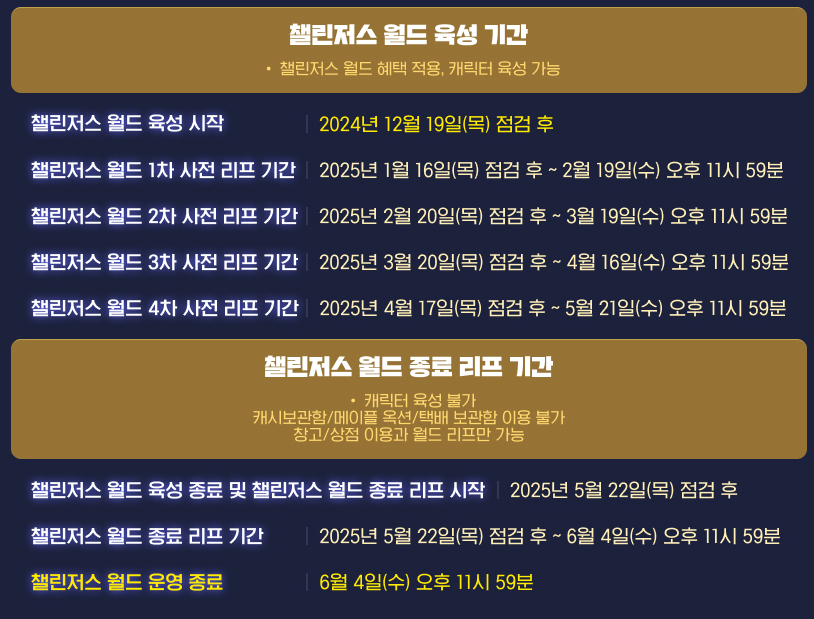
Event Participation Requirements:
- Level 130 or higher characters created in Challengers, Challengers 2, Challengers 3, or Challengers 4 worlds.
※ Zero characters that are level 130 or higher and have completed story quest Chapter 2 can Early Leap.
Event Period:
- January 16, 2025 after the maintenance ~ February 19, 2025 at 11:59 PM.
During the event period, you can leap your characters to your desired world through the NPC Isaga in Henesys. You can select the ‘Challengers World Early Leap’ event in the Event List and click the ‘Participate’ button to move to Henesys.
※ Worlds You can Leap To: All worlds.
※ You can move a total of 5 characters to other worlds through the Challengers World Early Leap and End Leap.
- Hyper Burning MAX Level Achievement rewards can be received based on the world you arrive in.
- Challengers Coins, Commemoration Badges, Advanced Commemoration Badges, and Premium Coins acquired in Challengers World will not be moved through World Leap.
- The Dawn Star Starlight Illusion skill levels will be applied based on the world you arrive in.
- Characters with active Meso Market transactions cannot proceed with World Leap.
- When World Leaping from Challengers World, items in the cash storage, storage, and Maple Auction will not be moved.
- Custom Backgrounds acquired using Voucher items will not be moved.
※ Custom Backgrounds acquired using Voucher items can be extracted into Vouchers through the NPC Isaga’s ‘Extract Custom Background’ option. The acquired Voucher can only be put into storage and is permanent.
- The Tera Burning effect applied when a character is created in Challengers World will not be transferred through World Leap.
※ The Tera Burning effect will be removed when the character is transferred, and the ‘Tera Burning Gift Giveaway!’ quest will no longer be available.
- The Strange Cube, Karma Meister Cube, Karma Strange Additional Cube, and Karma Star Force 17 Star Enhancement Scroll (Level 160) purchased from the Challengers Shop are Challengers World-only items and you cannot World Leap while holding them.
- The Selective Challengers Level 4 Special Skill Ring Voucher and the Special Skill Ring acquired from using it are Challengers World-only items and you cannot World Leap while holding them.
- If there are no empty character slots in the world you are moving to, slots will be added before the Leap.
- However, if you already have 49 characters in the destination world, you cannot Leap to that world.
Lady Blair’s Dream Express

Event Period:
- January 17, 2025 at 10:00 AM ~ January 24, 2025 at 10:00 AM.
During this time, you can freely move your Cash items between characters, regardless of cash restrictions.
Special Sunday Maple

Event Period:
- January 19, 2025
- January 26, 2025
- February 2, 2025
- February 9, 2025
- February 16, 2025
On January 19, the following benefits will take place:
- Miracle Time (12:00 AM to 11:59 PM)
- 2x chance to tier up potential/additional potential when using the Potential/Additional Potential Reset feature or any Cube item.
- 4x experience from Banquet’s Blessings
On January 26, the following benefits will take place:
- +250% Monster Park clear experience
- Rune respawn and cooldown decreased to 10 minutes
- +100% Rune experience buff effect
- +300% Combo Kill experience
- 5x experience from Polo, Fritto, and Especia Bounty Hunting
- 5x experience from Flame Wolf
- 4x experience from Banquet’s Blessings
On February 2, the following benefits will take place:
- 1+1 Star Force enhancements up to 10 stars
- 50% discount on Spell Trace enhancement costs
- 4x experience from Banquet’s Blessings
On February 9, the following benefits will take place:
- 100% success rate when enhancing items at 5/10/15 stars
- 50% discount on Ability reset costs
- 5x chance to get Magnificent Souls
- 4x experience from Banquet’s Blessings
On February 16, the following benefits will take place:
- +250% Monster Park clear experience
- Rune spawn and cooldown decreased to 10 minutes
- +100% Rune experience buff effect
- +300% experience from Combo Kills
- 5x experience from Polo, Fritto, and Especia Bounty Hunting
- 5x experience from Flame Wolf
- 4x experience from Banquet’s Blessings
 Orange Mushroom's Blog
Thanks for the hard work Max, Hope you get a TC this week from xsuu.
I did not get one but I appreciate the sentiment
Must be nice.
so no bdsm updates?
Is there item burning? I miss it. The only burning I get now is when I pee.
-Mad
Yes Item Burning is still going on but you should definitely go see a doctor for that
There’s no Hyper Burning medal from the Hyper Burning Booster? Did they forget to include it?
It is not included in the patch notes as a reward! Can’t confirm though since we don’t have the Hyper Burning Booster yet.
Is the item burning only for fresh hyperburns or can be used on already made characters?
This time it can be used on any character level 200+
Wait, does that mean you get two 1+4 Hyperburns during this event?
Yes
What are the old doll/jewel/relic odds?
Not disclosed