The newest test world patch brings a reorganization to the Character Info and Stats UI, including a new stat indicator called Combat Power, and a new episode of Dimensional Library. Like previous patches, Director Changseop did a Maple Now stream talking about the changes that were made. I swear I spend more time translating his 2 hour streams than I do the actual patch notes now…
Maple Now (October 19, 2023)
Test Server Events
This year, they combined the Camila event and the Halloween event into a single Maple Fashion Week event that lets you purchase lots of cosmetic items as well as get growth-related items every day, just by defeating 1000 mobs a day.
There are about 200 cosmetic items available in total. They even brought over some outfits from MapleStory M that many players liked and requested.
This patch, they have added World’s Best Punch King season 2. He joked that a lot of the time, events that have a season 1 never have a season 2 but this time it actually happened.
In contrast to the previous season, the scores are based on the total number of points you get instead of how fast you clear to avoid problems where things like killing the extra monsters fast enough or server lag would significantly affect your score. You can also retry without losing all of your buffs.
While Punch King was a good event for those who are strong enough to rank, and even for those who aren’t to watch the rankings/videos and see these powerful characters, they wanted to add a little bit for normal players. This time, you can receive a 30 minute 3x Experience Buff effect by talking to the rank 1 NPC in the map every day, and get VIP Coupons based on your best score which you can use for bossing or for training.
He really wants to release Union Arena season 2. It could be a really great motivator for players to improve their Union, but last time, the AI battles made it a little dumb rather than strategic, so it wasn’t really the experience they intended. When they can find a better way to implement it, they will release a season 2.
At this time, he started talking about their position on proxy content/control service which some people used last time. He stated that he thinks control service is not the right type of gameplay and unfair to other players. Their current operation policy for proxy services is mainly aimed at businesses where it can be clearly proven and action can be taken. But obviously there are a lot of other ways this can be done. They use things like not being able to participate in certain content on Red PC to stop this but there’s many ways around it so they are still working on ways to properly target this. They are clearly against it and will work on strengthening their policies in the future.
They also avoided giving temp stats around this time because of the Punch King event.
The ‘I Didn’t Do Anything But…’ event is returning with some changes to make it better (and it will overlap with other events rather than being a standalone event). They have changed it so that you store the same amount of experience as when you’re online or offline, so instead of being an event that pushes you to stay online for a long time, you can think of it as an event that encourages you to login daily. They have increased the amount of experience (about 2.3x better up to level 200, up to 10x better at level 259).
It has a similar side quest like last time with the pickaxe farming since more players worked on that than they expected to get the Diamond Pickaxe. Last time, mining the candy gave a little more experience because they used these off-season events to keep players online in between the winter/summer events but nowadays, there are many players still playing in between the big events so they don’t need to do stuff like that.
Character Info UI Reorganization
Previously, things like this would’ve been saved for the Spring Spring Project in winter/summer patches but as he promised before, they will try to make system changes as fast as possible to make the game better.
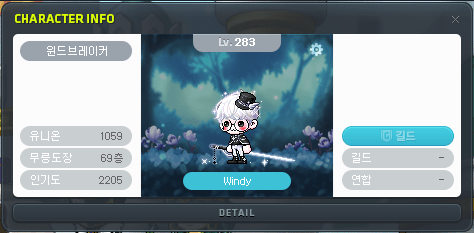
The character info UI has been reorganized. The previous UI was created based on the old 800×600 resolution that the game started with, but now that they have added FHD and QHD support, more and more players are using those higher resolutions and they want to make the best use of the increased screen size.
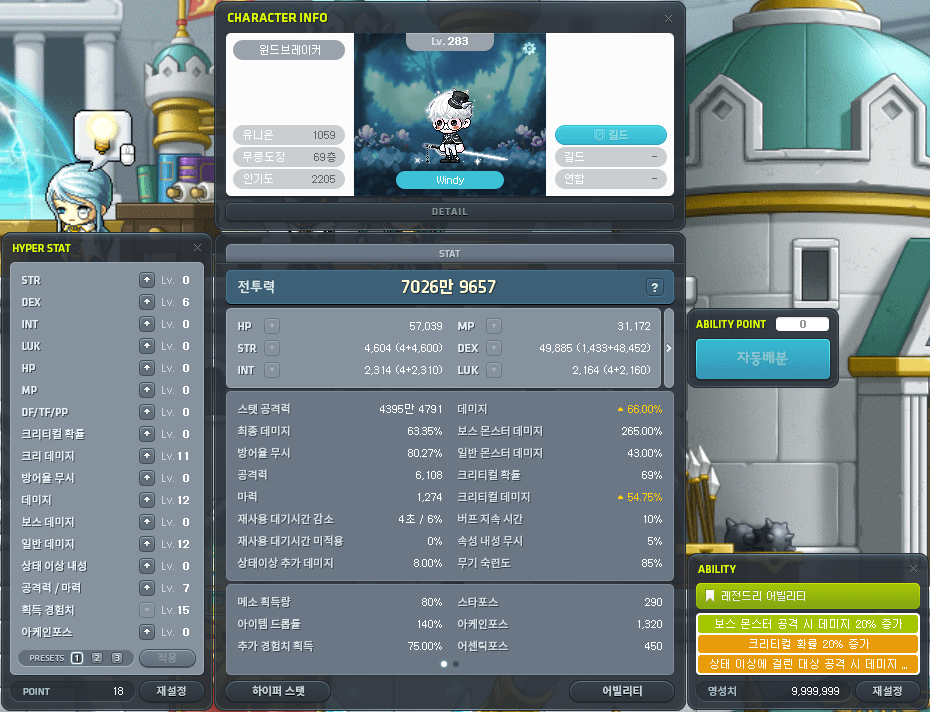
The character info UI and the stats window have been combined into a single UI with more information.
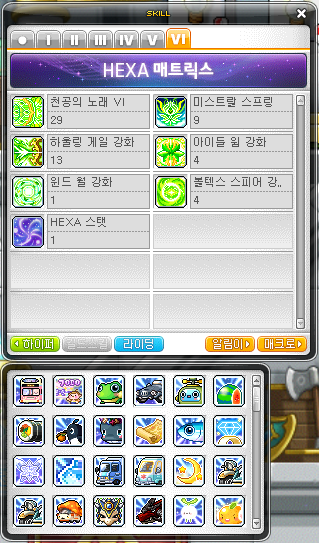
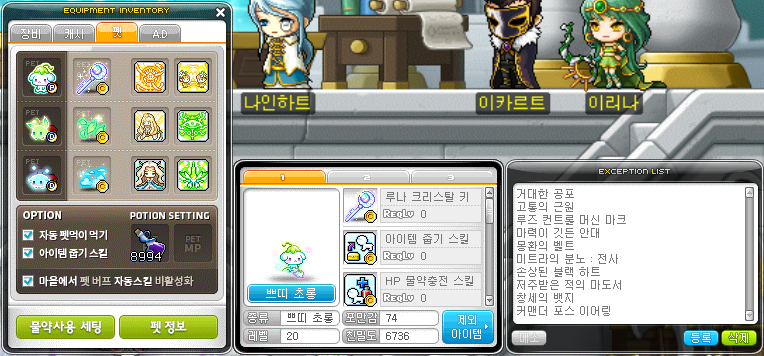
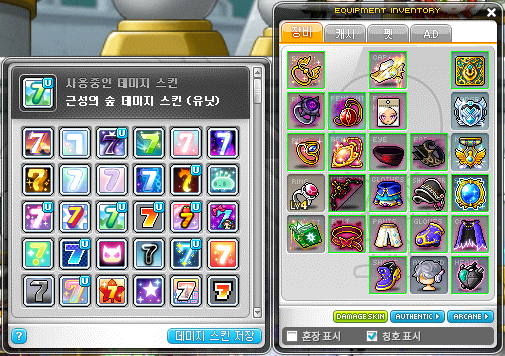
The Riding skills have been moved to the skill window and the Damage Skin window has been moved to the equipment inventory.
They know that this change will be both good and bad. Many existing players will have an unpleasant experience because it’s different from what you have become used to seeing, which is what the main designer of the new UI was worried about. They decided to go ahead with the change as it will be better for both new and existing players.
There are many other UI elements that are still based on the 800×600 resolution such as equipment and inventory, and those might also be reorganized in the future. As MapleStory has been in service for such a long time, there has been more and more content added that requires more information to be displayed, and the current UI was both unclear and a little old-fashioned for new players to understand.
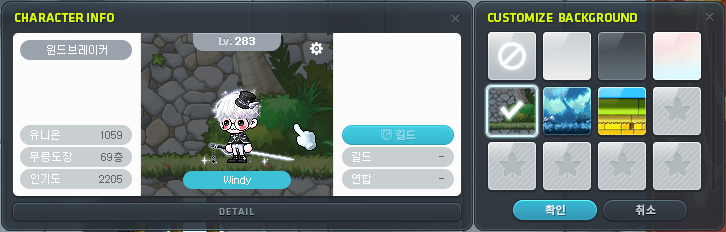
The top part of the UI is the previous character info UI. It has the same information such as Union, Mu Lung Dojo floor, fame, and guild. A new feature is to change the background of your character, to add a little bit more customization. There are 6 backgrounds now, and more can be added later like through events.
Combat Power
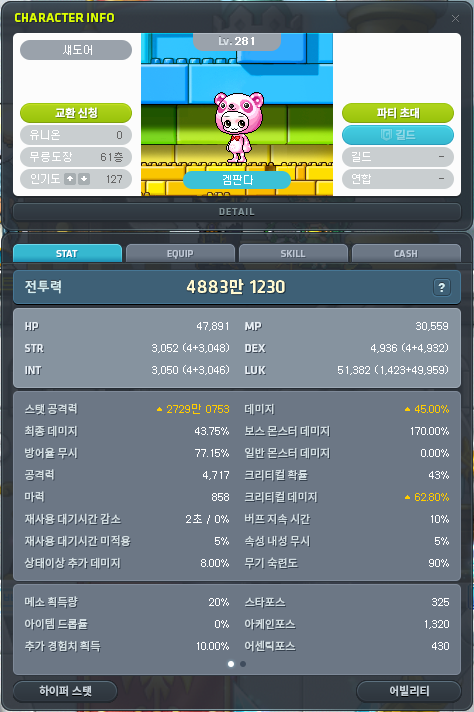
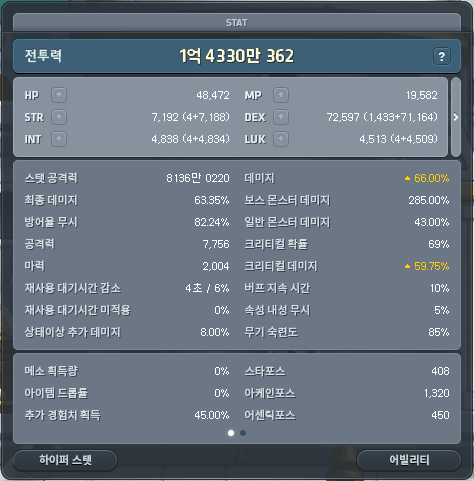
The lower part of the UI contains the stat window information, as well as the new Combat Power and some stats that previously were not shown such as normal monster damage, cooldown reduction, cooldown skip, elemental resistance ignore, status damage, weapon mastery, and additional experience. They have also reviewed all of the tooltips to fix any incorrect information, explain the calculation methods, and display all values. This was one of their goals as a lot of the combat-related aspects of the game are really complicated and not possible to understand without others explaining to you or through lots of experience. Even with the increased space, they still had to add a scroll wheel for the bottom part to show some other stats and leave room for expansion later.
They had a lot of discussion about Combat Power, such as what would be included or not included. Their first intention with this value was to provide an indicator for a character’s growth and the second intention was to give a value that you can use to compare with other players.
Right now, players use things like damage range and main stat to compare but you can’t use them to compare between different classes. Damage range can be affected by multiple things like classes’ skills, weapon attack, weapon multiplier, and main stat doesn’t distinguish between players with more or less Arcane/Authentic Force or Star Force.
They didn’t include Link Skills since most of them are situational or require some sort of activation, like Ark’s which takes time to ramp up. However, you can see other players’ Link Skills, which was implemented to help supplement the lack of including them in Combat Power.
They didn’t include certain stats like defense ignore, elemental resistance ignore, character level, Arcane/Authentic Force since they can differ in effectiveness based on the monsters being attacked. Things like cooldown reduction are also not applied even though they are quite beneficial to certain classes because it would be too difficult to calculate them into the Combat Power.
They didn’t include consumable items because it makes it easier to compare between players if there is a standard base level. Rather than artificially increasing your Combat Power by using a bunch of consumables, you can see the character’s base strength.
Although it’s not perfect and maybe a little primitive, they think it will be a very useful indicator for players and it’s better to have something like this rather than having nothing at all.
Other Characters’ Info
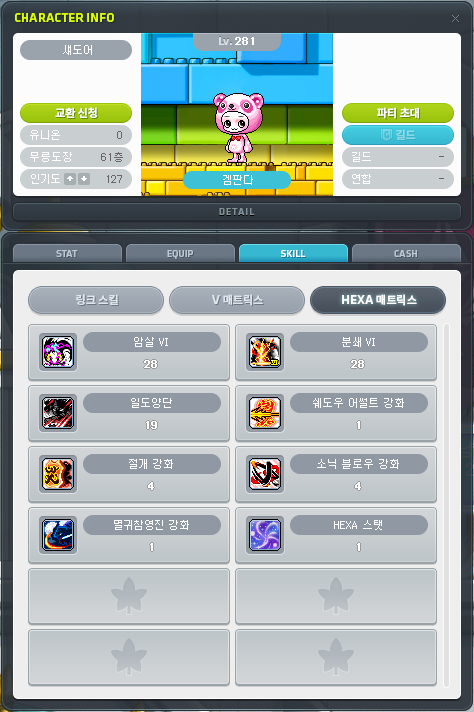
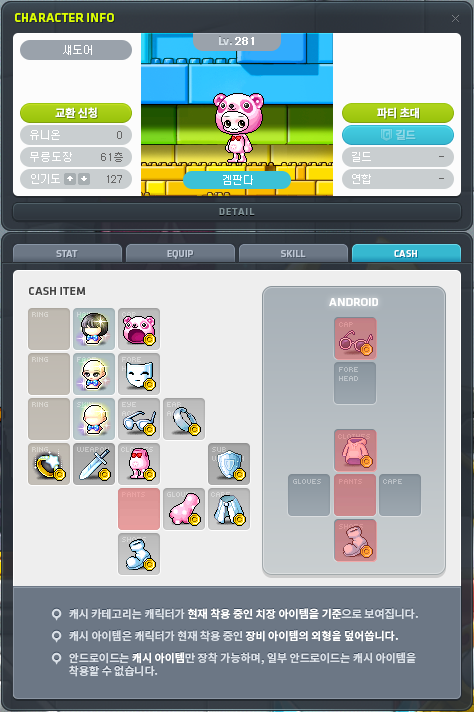
You can see other characters’ stats, equips, skills, and Cash items.
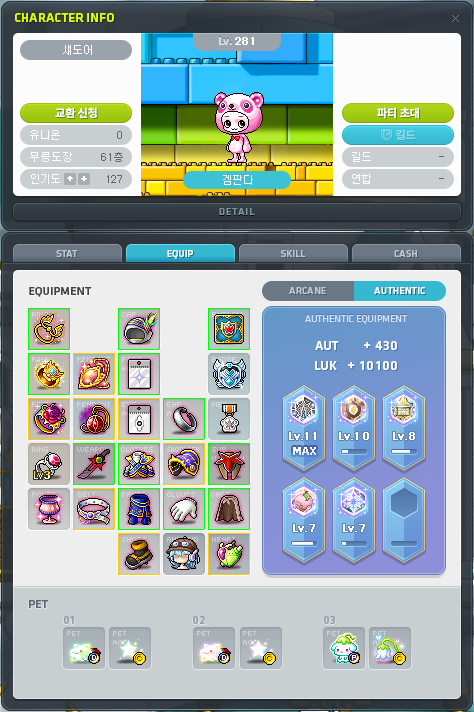
You can see all of their equipment, Arcane Symbols, Authentic Symbols, and pet equipment.
You can see all of their applied Link Skills, V Matrix, and Hexa Matrix.
The idea is that although Combat Power doesn’t include everything, you can combine it by looking at their other stats, equipment, and skills to get a better idea of a character’s strength.
Usually, things like this are opt-in. For example, you can currently see other players’ equipment on the homepage and on Maple Hands only if they have set their profile to public. However, this new system will be public for everyone without the option to hide it. They had a lot of internal discussions about whether or not to do this, and both sides had logical points but they eventually decided to do it.
There were two reasons why, the first being for ease of use for future plans they have. For example, they are planning to release a Star Force probability related API this winter, and also an API that lets you scrape things related to character information. This is for the many players with programming knowledge that can develop things that generate meaningful data (and he gave the converted stat spreadsheet as an example). Providing more accurate data with less omissions will make it more likely for some interesting things to be made. The second reason is that as explained before, the Combat Power stat does not include everything and you need to check these other stats to get a better idea of a character’s strength. They thought that in the long run, it would be more helpful if everyone’s information was visible.
Dimensional Library
Dimensional Library: Episode 7 – Sephiroth’s Gardener has been added.
Although some of the data was added to the test world for internal testing, it is not available to play through. Even though they changed their thoughts about adding new stories into tespia a few years ago (i.e. the full stories are available to test), this Dimensional Library content is a bit different in that it’s entirely focused on the story rather than unlocking a new area or something like that. This means it requires a different type of testing that they can mostly complete without players.
This episode is about Gerand Darmoor. He is a key character in the Grandis arc, similar to the Black Mage in Maple World, but his backstory has been lacking. Since this is a Dimensional Library story, it is not affected by the flow of time or progressing the main story, so they aim to better explain what kind of character Gerand Damoor is and how his thought process works.
They’re very focused on improving their production and direction of story content. Although it might seem minimal to players, they put a lot of thought into things like new transitions to help show the passing of time, using more spine animations, and improving their technical skills to use in the main story in the future.
It isn’t meant to be a long story or a huge amount of backstory but they want to have something where you can enjoy a story with a few memorable moments.
It’s hard for them to progress the main story now that the newest area, Carcion, is already level 285, so they are looking at ways like this to help supplement it.
Improvements
Previously, Dimensional Library updates were off-season and so they were designed to have a little more playtime required. However, now that they are mainly for the story, they decided to lower the previous Episodes’ quest requirements to make them easier to enjoy.
They removed the storage meso cost to make it a bit more convenient when moving items between mules that have no mesos.
Conclusion
About the class being remastered, he asked players to wait a little bit more. They are working hard on a well-prepared remaster with a fun surprise and abundant events.
About Haste events, he doesn’t think they’ll be using that name for a while. The Chew Chew Slushie event inherited some parts of the Haste event.
He talked a little bit about how he visited the Maple Pop-Up Shop with Wonki and BTS Jin, and how he was so handsome that it felt unrealistic to stand next to him for a picture.
About the players in chat anxious about the Monster Life replacement, he reassured them that the elements that they worked hard on in the current Monster Life will be preserved in some way in the new system.
The existing [Character Info] UI and the [Stats] UI have been combined into one. The existing UIs have been removed and certain features/information have been moved to other UI.
Ridings: You can now see them in the [Skill] UI’s Riding feature.
Pet Info: You can now see the [Equipment Window] UI’s ‘Excluded Items’ feature in the ‘Pet Info’ feature.
Damage Skins: You can now see them in the [Equipment Window] UI’s ‘Equips’ tab.
A feature to change your character avatar area’s background has been added. You can use the background change feature by clicking on the character avatar area in the Character Info UI.
You can now check other characters’ information.
Stats: You can check the detailed values of the stats applied to that character.
Equipment: You can check that character’s equipped items, Symbols, pets, and pet equipment.
Skills: You can check the Link Skills and 5th job/6th job skills applied to that character.
Cash: You can check the outfit preset applied to that character and the cosmetic items equipped to their Android.
※ For Angelic Buster and Zero jobs, the cosmetic items applied to the current character’s appearance will be displayed.
New information has been added to the [Character Info] UI.
Combat Power
Normal Monster Damage
Cooldown Skip
Cooldown Reduction
Additional Status Damage
Weapon Mastery
Elemental Resistance Ignore
Additional Experience Acquisition
※ Combat Power is a calibrated value that you can use to conveniently compare your growth level with other characters.
※ Detailed information about Combat Power can be found by clicking the Help button in the Character Info UI.
Combat Power reflects your character’s base stats, equipment, traits, Ability, Hyper Stats, Maple Union’s attackers and board effects, Monster Life potential, and Hexa Stat. It does not reflect stat boosts from skills (including Links and Guild Skills), or stat boosts from any consumable items. However, it does include the following skills and consumable items that are directly affected by a character’s equipment growth or consistently affect damage.
Arrows, Throwing Stars, Bullets’ stats
Blessing of the Spirit or Blessing of the Empress
Star Force Conversion
Yaldabaoth of Destruction
It includes a character’s main stat, sub stat, attack/magic attack, damage, boss damage, final damage, and critical damage.
It does not include factors that are different based on the map or monster being attacked, such as character level, defense ignore, elemental resistance ignore, Arcane Force/Authentic Force. It also does not include the weapon multiplier that is applied differently to each class. Your weapon’s attack/magic attack will be converted to a standardized value based on its level, rank, additional options, and Star Force values.
For smoother comparison between classes, Demon Avenger and Xenon’s Combat Power have an additional multiplier since their main stat calculations are different than normal classes. This multiplier will change based on their current Combat Power. For Zero, the secondary weapon’s certain base stats and additional options will not be applied to Combat Power.
Character Info UI’s Explanation
Certain existing stats’ names have been changed.
Boss Damage → Boss Monster Damage
Crit Damage → Critical Damage
Certain stats’ descriptions have been improved to be more accurate.
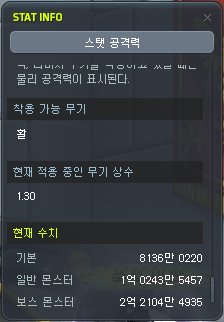
You can now check additional information through the ‘Damage Range’.
The information about weapons that can be equipped has been added.
The weapon multiplier applied to the currently equipped weapon has been added.
The Damage Range values when attacking boss/normal monsters have been added.
※ The Character Info UI will display the same base Damage Range as before.
It has been improved so that you can check a stat’s current value and applied values through a popup as well. When you click on each stat, a popup with that stat’s current value and all applied values will be opened.
※ The stat popup feature cannot be used on other characters’ Character Info UI.
In ‘Dimly-Lit Summer 4’, it has been improved so that the background objects do not block the platforms.
In ‘Cernium/Cernium Square’ and ‘Odium/City of Researchers’, it has been improved so that characters cannot interact with the special portals while flying.
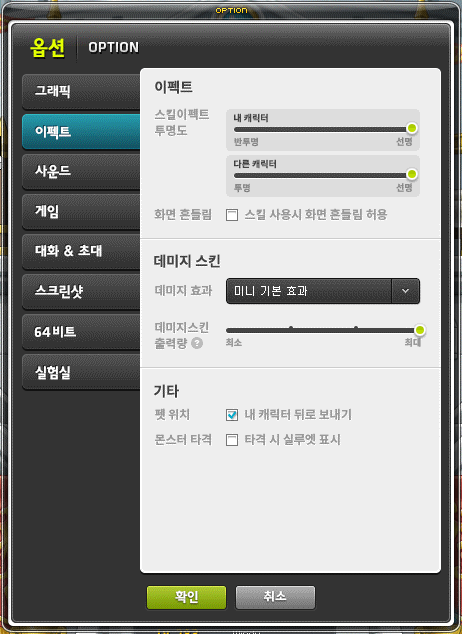
In the Options UI, the Effects tab has been added. Certain settings from the Graphics tab have been moved to the Effects tab.
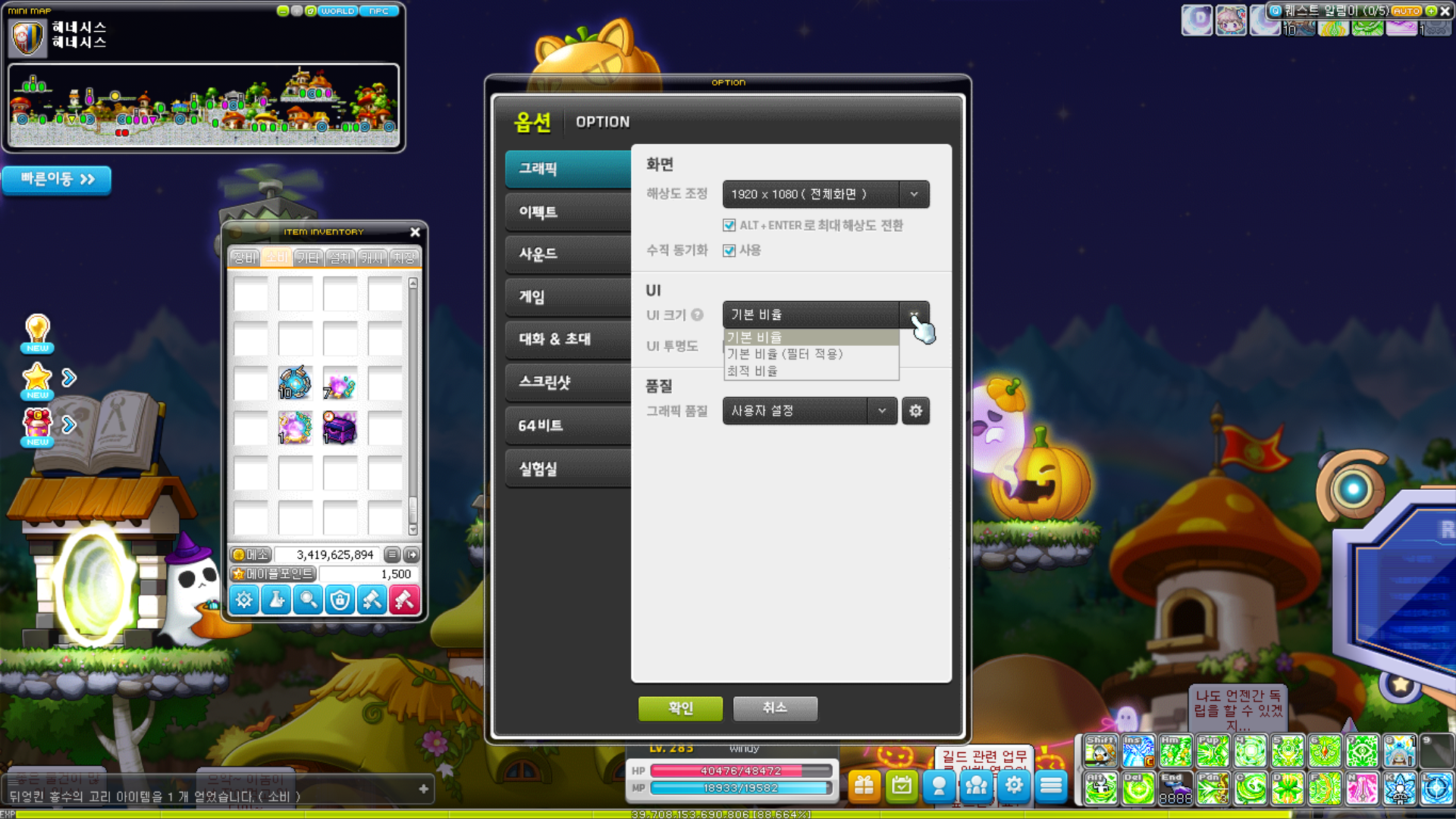
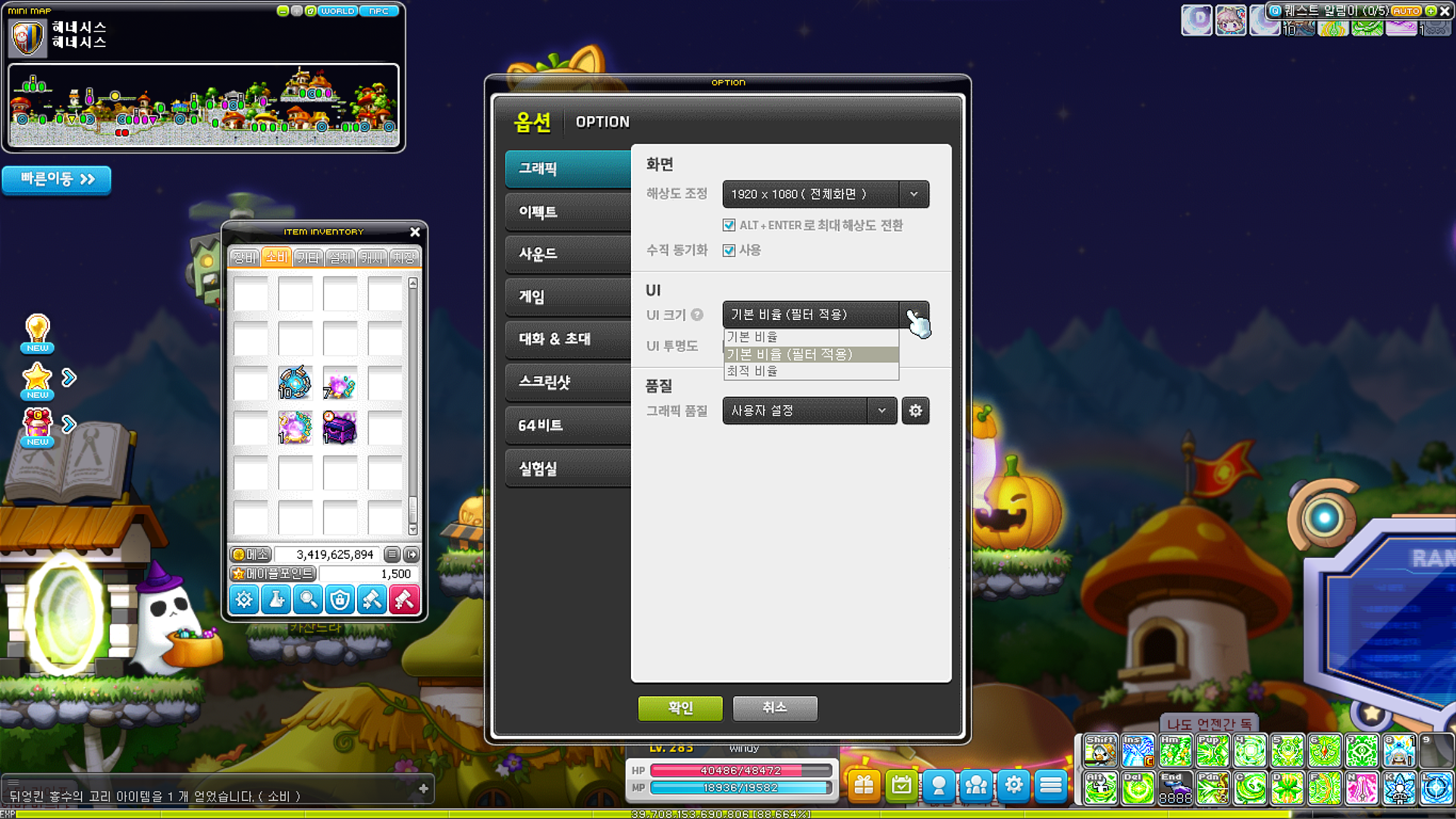
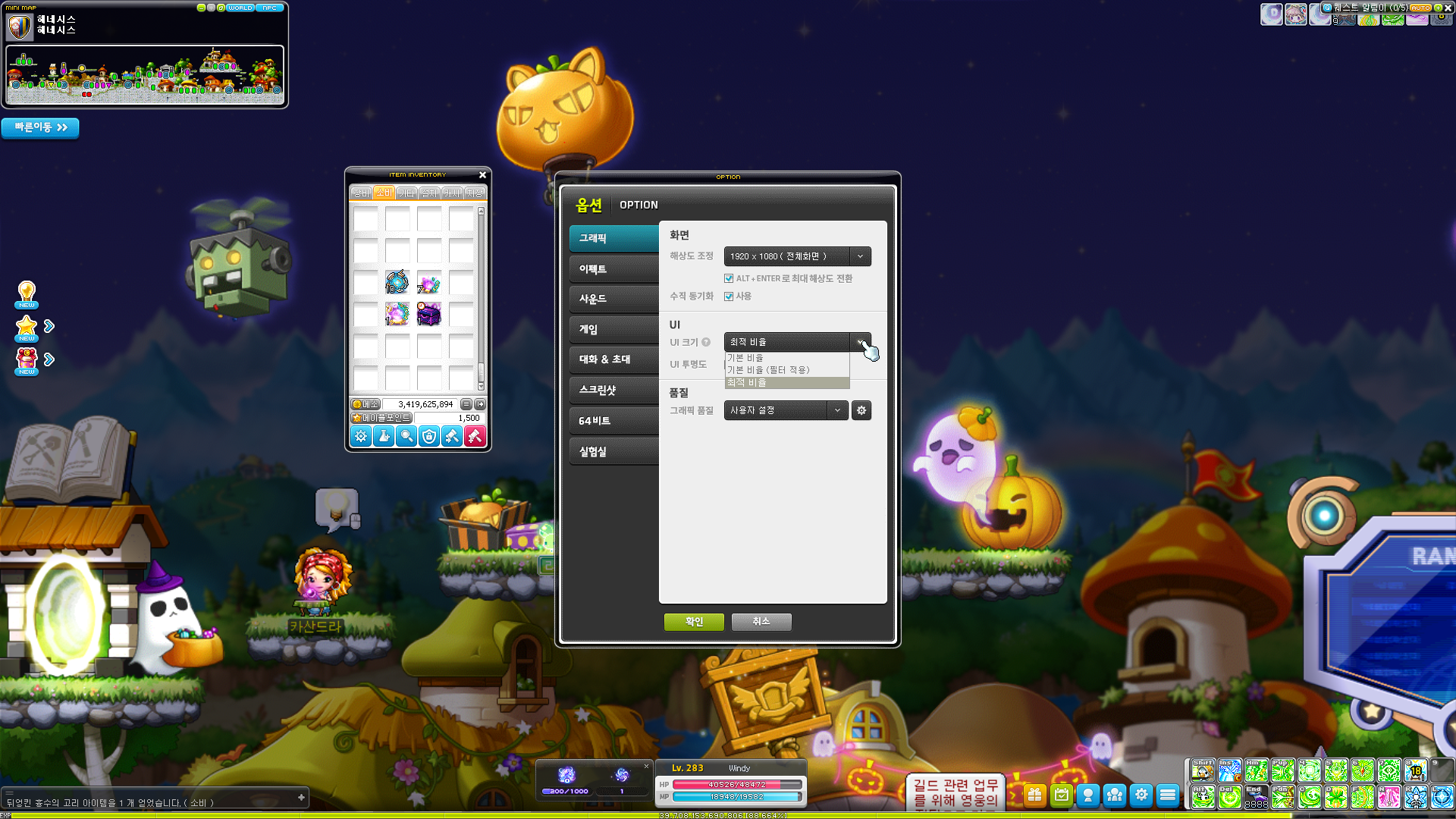
The Options UI’s Graphics tab’s UI Optimization option has been removed, and the UI Size Setting option has been added. However, it is only available to 1920 x 1080 resolution or higher. The functions of each option are as follows.
Default Ratio: The UI’s size is increased by the same ratio that the UI occupies in 1366*768 resolution.
Default Ratio (Filter Applied): The UI’s size is increased by the same ratio that the UI occupies in 1366*768 resolution and a sharpening filter is applied.
Optimized Ratio: The UI is changed to a size appropriate for the current resolution.
Users who are appearing offline can no longer be invited to a party through the party invite command or the party UI. However, if you are on the same channel or map as a user appearing offline, you can invite that user through the party invite command or the party UI.
In the Zero Mirror Dungeon, you can no longer request entry from a buddy appearing offline.
It has been improved so that during Ursus entry matching, when participants refuse entry, it will immediately start matching for new participants regardless of whether or not the remaining participants vote.
Fixed an issue where the cursor in the boss party recruitment UI was abnormal in certain situations.
You can now disassemble up to 10 items at a time, even if you have learned Equipment Crafting or Accessory Crafting.
When using the inventory’s Disassemble button in Meisterville, it has been changed to be disassembled based on the highest level profession. However, if you have Meister or higher Alchemy, it will be disassembled based on your Alchemy level.
Noblesse Guild Skills’ buff effects will now be maintained even if you disconnect from the game and reconnect. However, the buffs’ durations will continue to elapse while you are offline.
A retry feature has been added to Underground Culvert. You can retry through the NPC Daedal in ‘Road from the Altar’. When you enter through the retry feature, your buffs will not be reset.
Flag Race’s completion conditions have been changed from 3 laps to 1 lap. The points acquired for each course have been changed as follows.
Fixed an issue where sometimes the Demon Force effect would be displayed when using skills on non-Demon Slayer jobs.
Fixed an issue in boss battle maps where if you died at the same time as using certain Origin skills, soemtimes the connection to the game server would end. The affected skills are as follows.
Archmage (F/P) – Infernal Venom
Shadower – Resolute Strike
Angelic Buster – Grand Finale
Viper
Fixed an issue where sometimes the connection to the game server would end while Liberate Neptunus’ Neptunus Enrage activated.
Mikhail
Fixed an issue where party members affected by Rho Aias’ effects were not defended against Seal or Blind.
Fixed an issue where Durandal’s Absolute Bind effect only applied to the first attack.
Aran
Fixed an issue where Blizzard Tempest’s bind did not function properly when used on an enemy that was Absolute Bound.
Luminous
Fixed an issue where you could not enter Equilibrium mode through Harmoic Paradox’s Power of Truth.
Eunwol
Fixed an issue where Advent of the Protector God’s awakenings were not affected by Spirit Bond 1’s effects.
Fixed an issue where Advent of the Protector God’s Protector God Chain Claw was not affected by Spirit Bond 1’s effects.
Fixed an issue where Advent of the Protector God’s Fox God’s Manifestation was not affected by Spirit Bond 1’s effects.
Kain
Fixed an issue where after Remain Incense was created, if you changed maps and they were removed, the attack would still activate.
[Execute] Chain Sickle’s skill description has been changed to be more accurate.
[Execute] Fatal Blitz’s skill description has been changed to be more accurate.
Fixed an issue where Falling Dust VI and [Possess] Falling Dust VI’s cast actions were not cancelled when casting Thanatos Descent’s Area of Death.
Zero
Fixed an issue where after Time Piece’s Time Traces were created, if you changed maps and they were removed, the attack would still activate.
Lara
Fixed an issue where Manifest: Wind Swing’s party member usage mode setting was not applied if you revived and recreated Wind Swing.
Fixed an issue where in certain resolutions, the ‘[Odium] Contaminated Researcher’ and ‘[Shangri-La] Peach Blossoming Paradise’ quest cutscene images were displayed awkwardly.
Fixed an error where the screen was blurry after completing the ‘[Odium] Contaminated Researcher’ quest.
Fixed an error where ‘Queen of the Fairies’ could not be completed in certain situations.
Fixed an issue where certain NPCs’ chat window images were awkward during the 6th job advancement quests.
Fixed an issue in Maple Chronicle: Book of Arcane River – ‘City of Dreams, Lacheln’ where the chat window images disappeared.
Fixed an issue in Maple Chronicle: Book of Grandis – ‘Carcion’ where certain NPCs’ chat window images appeared awkwardly.
Fixed an issue when claiming the ‘Heroes of Maple’ clear rewards where the message when you could not claim them was awkward.
Fixed an issue where the Kritias area weekly quests’ guide text was awkward.
Fixed an issue where if you entered a cross world channel, the ‘Diligent Adventurer’ medal challenge’s play time would be reset intermittently.
The [Destroyed Henesys] Dream Fragment quest has been removed from the completion conditions for the [Door to the Future] Truth of the Future quest.
Fixed an issue where the Halloween Damage Skin’s preview image was awkward.
Fixed an issue where if a character’s name was more than a certain number of characters, it would be displayed awkwardly in the Symbol of Honor/Brilliant Symbol of Honor Chairs.
Fixed an issue where certain items’ colours appeared awkwardly on the MapleStory Homepage, Maple Hands+ app, and the Cash Shop’s saved ‘My Outfits’ character images if they had the Colouring Prism used on them.
Fixed an issue where if you equipped a weapon whose colour was changed with a Colouring Prism then you equipped a different Cash weapon in the Maple Auction’s preview, the equipped weapon’s colour would be displayed.
Fixed an error where title items could not be equipped in certain situations.
Fixed an issue in Protect Esfera where monsters could fall to the lowest platform.
Fixed an issue in ‘Monster Park Extreme/Unknown Area’ where when moving from the left or right bottom platforms to the top platforms, the character was blocked by the tree background.
Fixed an issue in ‘North Forest/Giant Tree’ where the upper left corner tree trunk background appeared awkwardly.
Fixed an issue in ‘Simple Station Railroad’ minimap where the Authentic Force guide value for the ‘Train With No Destination 1’ was incorrect.
Fixed an error in ‘Henesys/House with a Fallen Wardrobe’ map where characters unable to do the quest could enter.
Fixed an error in ‘Hotel Arcs/Desolate Wasteland City’ where characters could not move in certain locations.
Fixed an error in ‘Cernium/Cernium Square’ where when using the special portals, pets and Androids’ locations were awkward.
Fixed an error in ‘Black Heaven Interior/Vent Passage’ where you could escape from the map.
Fixed an issue in ‘Mushroom Hill Midway’ where the minimap appeared awkwardly.
Fixed an issue where the ‘Explore Blue Mushroom Forest’ mission for the ‘[Area Exploration] Henesys Exploration’ achievement could not be completed even after entering Blue Mushroom Forest.
Fixed an issue where you could not use the Teleport World map to move to ‘Golden Temple’ area maps.
Fixed an issue where trying to craft an item that can only be crafted 1 time after using a recipe would appear to be able to be crafted multiple times.
Fixed an issue where the following achievements counted abnormally when acquiring Monster Collection line rewards.
[Monster Collection] Small Expedition Leader [Monster Collection] Decent Expedition Leader [Monster Collection] Good Expedition Leader [Monster Collection[ Advanced Expedition Leader
Fixed an issue where the Hilla’s Dignity, Magnus’ Dignity, and Seeing Fire From Across the River medals were not registered in the Medals tab.
Fixed an issue where switching screens after moving the client by pressing the Windows key and arrow keys in windowed mode, the client would return to its previous location.
Fixed an issue in the Dimensional Mirror where the mouse recognition range for displaying reward item information was set incorrectly.
Fixed an issue in the Meso Market where unused menus were displayed incorrectly.
Fixed an issue in Fritto’s Bounty Hunting where in certain resolutions, the bottom guide text was not displayed.
Fixed an issue in the Potential Stamp UI where sometimes the client would stop when checking the item tooltip.
Fixed an issue where certain UIs did not move to the top even after clicking on them with the mouse.
Fixed an issue where after creating a Demon character, when job advancing to a Demon Avenger, the hair colour was different than the one displayed on the character creation window.
Fixed an error in certain situations where in the chat window, system messages wre displayed repeatedly.
Fixed an error in certain situations where the client would close during boss party recruitment.
14 Responses to “KMST ver. 1.2.162 – Character Info UI Changes”
The rest of the stackable Symbol Vouchers! Finally… This should have been implemented years ago, back when each symbol was introduced- or at least alongside the Arcane Symbols change. I don’t understand why it took them so long to change it and more so why Authentic Symbols weren’t included last time. Now it’s going to take GMS 6 months to do the same…
Between that and common Use items stacking to 9999, this is a good patch.
Is there anything else about storage? Did they change it so that it has tabs like inventory or at least have the ability to expand the inventory side to have more than 4 columns?
Someone let Nexon know that character ui already shows your dojo floor, there’s no need to show your entire maple resume + your home address + a new made up number to get a handle on how strong someone is.





The rest of the stackable Symbol Vouchers! Finally… This should have been implemented years ago, back when each symbol was introduced- or at least alongside the Arcane Symbols change. I don’t understand why it took them so long to change it and more so why Authentic Symbols weren’t included last time. Now it’s going to take GMS 6 months to do the same…
Between that and common Use items stacking to 9999, this is a good patch.
Thanks for the translations.
By toggaFemoS on October 20, 2023 at 8:50 pm
good patch but I liked the colors of the old ui lol
By Anonymous on October 20, 2023 at 10:16 pm
good patch but I liked the colors of the old ui lol
By Anonymous on October 21, 2023 at 4:34 am
nice
By Anonymous on October 21, 2023 at 4:34 am
Is there anything else about storage? Did they change it so that it has tabs like inventory or at least have the ability to expand the inventory side to have more than 4 columns?
By Anonymous on October 21, 2023 at 5:07 am
You could already expand the inventory side since a few patches ago
By Anonymous on October 27, 2023 at 11:29 am
they want give 1 6th job skill per year????
By Anonymous on October 21, 2023 at 5:43 am
They said they wanted to prioritize finishing mastery cores first.
By Anonymous on November 6, 2023 at 2:49 pm
Someone let Nexon know that character ui already shows your dojo floor, there’s no need to show your entire maple resume + your home address + a new made up number to get a handle on how strong someone is.
By Anonymous on October 21, 2023 at 8:53 am
Like anyone does dojo.
By Anonymous on October 22, 2023 at 5:49 pm
Step 1 Borrow eq from friends
Step 2 Dojo gets 70-80floors
Step 3 Find a random pt and pretend tat i am 70-80floors player
Step 4 profit.
By Anonymous on October 25, 2023 at 8:24 am
Step 5 Fail to do 5%.
By Anonymous on October 26, 2023 at 6:24 am
I did not know you could borrow eq from friends in reboot server, so how did u access to step 5? Can u teach me how?
By Anonymous on October 26, 2023 at 7:48 am
I didn’t know reboot server is the only server in maplestory as well, thanks for enlightening me!
By Anonymous on October 27, 2023 at 11:28 am